
我用 Istio ambient mode 將 namespace 納入 mesh,不必為每個 Pod 加入 sidecar。Ztunnel 處理 L4 安全通訊;需要 L7 路由、授權或遙測的服務,再加入 waypoint。
這裡讓公開 API example-api 使用 service-scoped waypoint;example-worker 先使用 ambient L4。example-admin 維持內部存取,之後也可以納入 ambient。
用 namespace label 啟用 ambient
Sidecar mode 在各個 Pod 加入 Envoy;ambient 的第一層則由 Istio CNI 與 node 上的 ztunnel 處理流量。Namespace 的設定如下:
apiVersion: v1
kind: Namespace
metadata:
  name: example-api
  labels:
    istio.io/dataplane-mode: ambient
Label 會將符合條件的既有與新 Pods 納入 mesh,不需要為了 enrollment 重新建立 Pods。L7 功能則需另外部署並選用 waypoint。參考 Istio workload enrollment。
GitOps 同步順序
我的 app-of-apps 範例依序安裝:
- wave
-40:Gateway API CRDs。 - wave
-30:Istio base CRDs 與 cluster roles。 - wave
-20:Istio control plane。 - wave
-10:Istio CNI。 - wave
-5:ztunnel。 - wave
10+:application namespaces 與 workloads。
套用 namespace label 前,先確認 CNI 與 ztunnel 健康,避免 workload 和 mesh 同時出問題時難以分辨原因。
建立 waypoint 並選擇 Service
使用 gatewayClassName: istio-waypoint 建立處理 Service 流量的 Gateway:
apiVersion: gateway.networking.k8s.io/v1
kind: Gateway
metadata:
  name: example-api-waypoint
  namespace: example-api
  labels:
    istio.io/waypoint-for: service
spec:
  gatewayClassName: istio-waypoint
  listeners:
    - name: mesh
      port: 15008
      protocol: HBONE
再由 Service label 選用它:
apiVersion: v1
kind: Service
metadata:
  name: example-api
  namespace: example-api
  labels:
    istio.io/use-waypoint: example-api-waypoint
spec:
  selector:
    app: example-api
  ports:
    - name: http
      port: 3000
      targetPort: 3000
Service label 為送往該 Service 的 mesh 流量選用 waypoint;同一個 ambient namespace 裡的其他 Services 可以維持 L4。
來自 Istio ingress gateway 的流量預設會略過目的 Service 的 waypoint。若這條路徑也需要 L7 處理,Istio 1.25 起支援在目的 Service 或 Namespace 加上 istio.io/ingress-use-waypoint: "true",並要求 istiod 啟用 ENABLE_INGRESS_WAYPOINT_ROUTING=true。上方 Service manifest 尚未啟用這條路徑;依賴 waypoint policy 保護公開請求前,要確認設定與實際流量。參考 ingress gateways and waypoints。
既有 workload 何時需要 restart
加上 ambient label 本身不需要 restart。移除舊 sidecar 配置,或刻意建立流量與 metrics 的前後驗證點時,才逐步重啟:
kubectl -n example-api rollout restart deployment example-api
kubectl -n example-worker rollout restart deployment example-worker
每次遷移一個 workload 後,都要確認流量路徑。新建立的 Pods 不需要為 enrollment 再重啟一次。
用 ServiceEntry 辨認外部 API
部分 Pods 會呼叫叢集外的 HTTPS API。我使用明確的 FQDN 建立 ServiceEntry,讓 mesh 與 Kiali 分類 egress 流量:
apiVersion: networking.istio.io/v1
kind: ServiceEntry
metadata:
  name: example-vendor-api
  namespace: example-api
spec:
  hosts:
    - api.vendor.example
  location: MESH_EXTERNAL
  ports:
    - number: 443
      name: tls
      protocol: TLS
  resolution: DNS
檢查 enrollment 與流量
先確認 ambient 元件:
kubectl -n istio-system get pods -l app=ztunnel
kubectl -n istio-system get pods -l k8s-app=istio-cni-node
kubectl -n istio-system get pods -l app=istiod
再檢查 namespace、waypoint 與 Service label:
kubectl get namespace example-api --show-labels
kubectl -n example-api get gateway example-api-waypoint
kubectl -n example-api get deploy,svc | grep waypoint
kubectl -n example-api get svc example-api --show-labels
外部目的地和應用程式狀態分別查看:
kubectl -n example-api get serviceentry
kubectl -n example-api get pods -o wide
kubectl -n example-api logs deploy/example-api --tail=80
以私有入口查看 Kiali
我讓 Kiali 維持 ClusterIP。即使家用 lab 開啟 anonymous auth,也只透過本機 port-forward 查看:
kubectl -n istio-system port-forward svc/kiali 20001:20001
在本機開啟 http://127.0.0.1:20001。
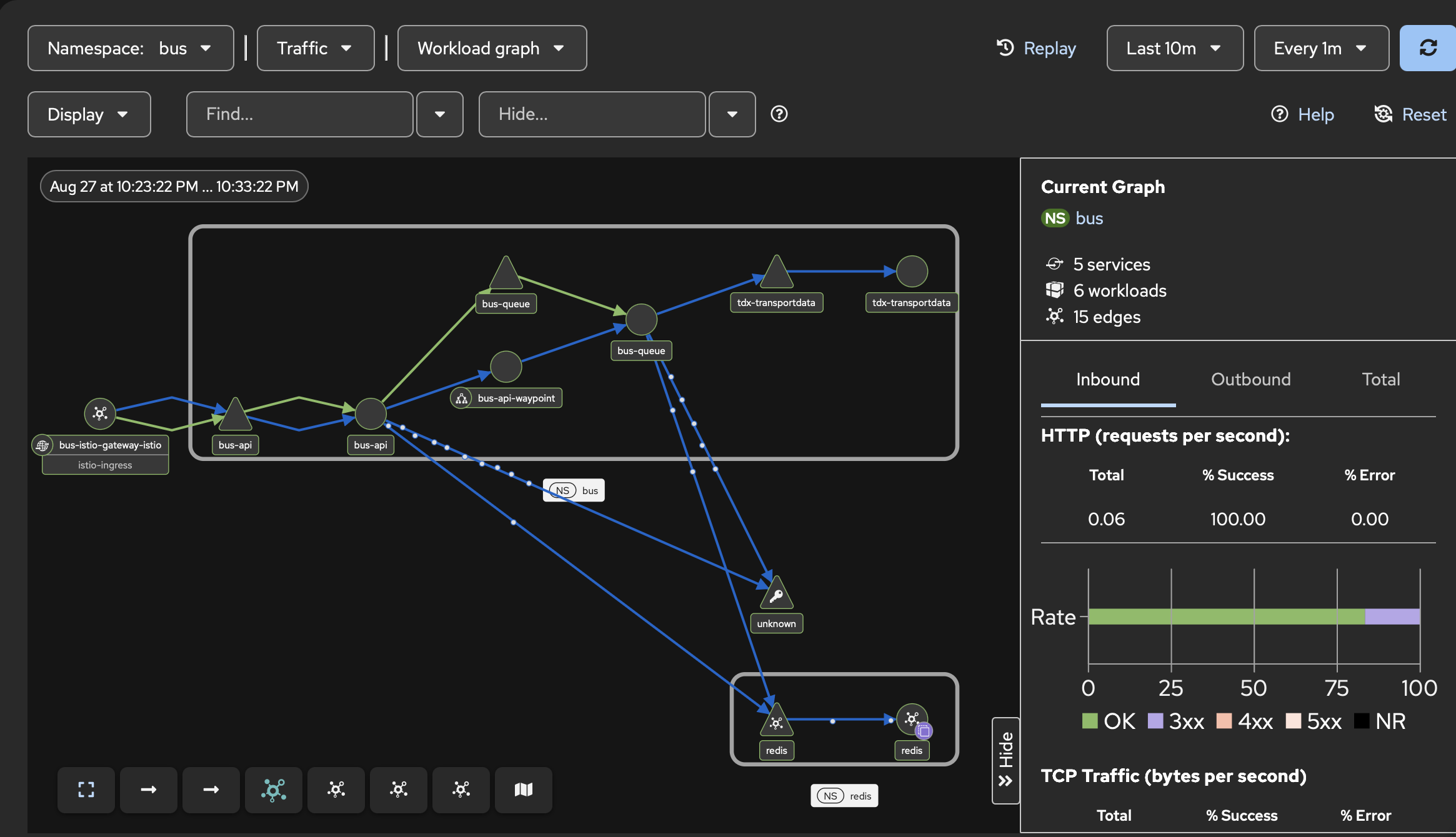
圖中包含公開 Istio Gateway、bus-api 的 service-scoped waypoint,以及流向 queue 和 Redis 的下游流量。
Kiali 用來查看 mesh 與控制平面狀態,這套配置不透過公開 Gateway 提供存取。
常見問題
Waypoint 沒有建立時,先確認 Gateway API CRDs 與 Istio control plane 是否先同步完成。Service label 存在但流量不如預期時,檢查 workload enrollment,以及遷移中的舊 sidecar 是否已移除。
Kiali 顯示 unknown external traffic 時,對照 Pod 實際呼叫的 hostname 是否有 ServiceEntry。若某個 namespace 尚未準備好承接 mesh 流量,可以先移除 ambient label,再分別排查。