
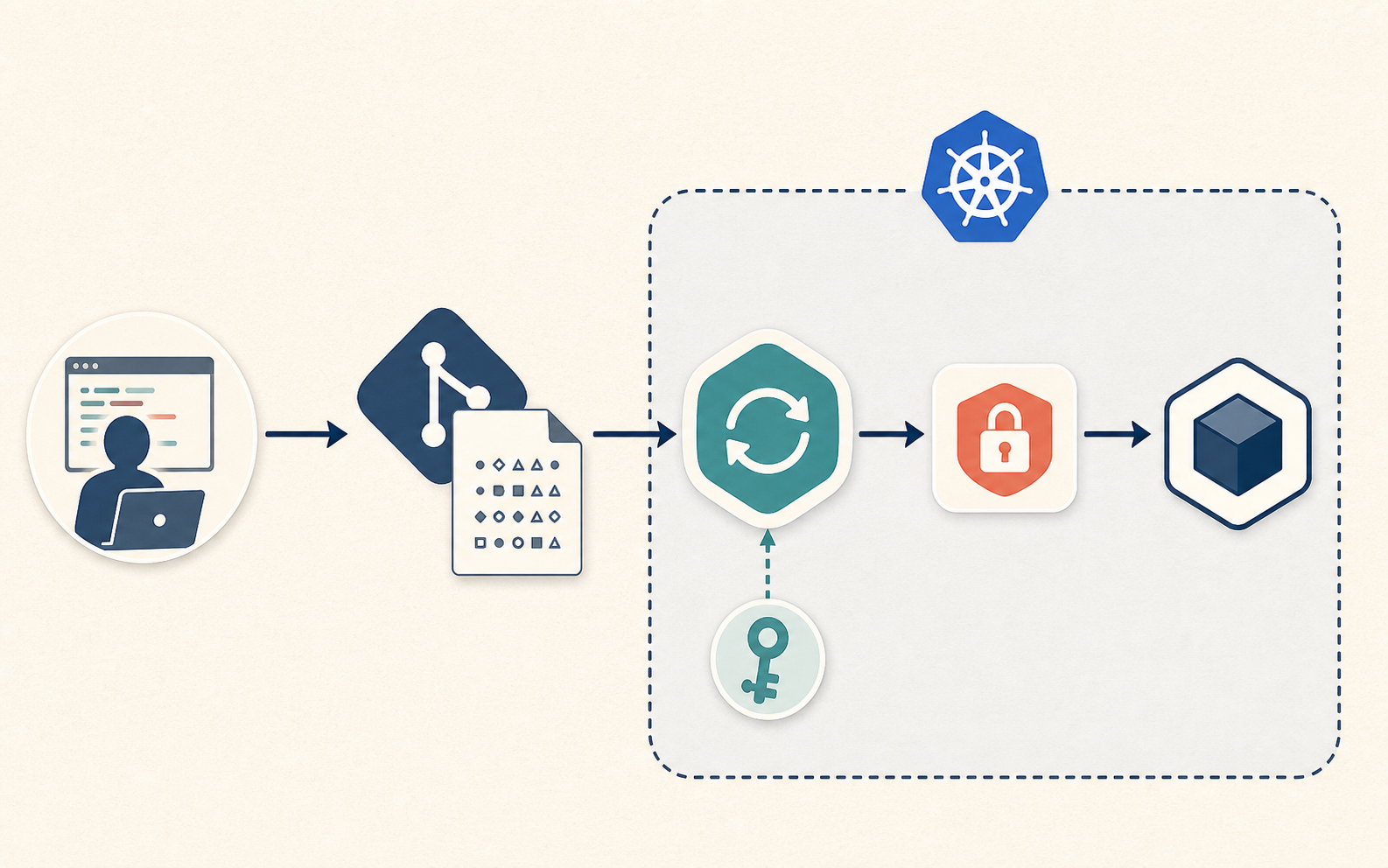
SOPS 可以讓加密後的 Kubernetes Secret 值保存在 Git,部署時再由 GitOps controller 解密。它與 Vault 的差別在於資料來源:Vault 提供 runtime 值,SOPS 則以 Git 裡的加密檔為 source of truth。
encrypted Secret in Git → GitOps controller 解密 → Kubernetes Secret → Pod
小型 cluster、不依賴 Vault 的 bootstrap、需要和 manifest 一起審查的設定,以及以 Git 加上受保護金鑰重建 cluster,都是適合考慮 SOPS 的情境。
金鑰與解密資料放在哪裡
Git 保存加密值與 public recipients;cluster 保存私鑰,controller 在處理 manifests 的流程中解密,Pod 最後取得一般的 Kubernetes Secret。
不要將私鑰提交到 Git、讓 CI 輸出解密資料,或把解密後的檔案寫回 repository。Argo CD repo-server 與 Redis 也不能任由其他 workloads 存取。解密後仍需 Kubernetes RBAC、namespace 隔離與 runtime 存取限制;有權讀 Secret 或進入 Pod 的人仍可能取得原值。
產生 age identity
SOPS 支援 age、OpenPGP、AWS KMS、GCP KMS、Azure Key Vault 與 Vault transit。對家用或小型 cluster,我會選擇 age:public recipient 可以放進 .sops.yaml,private identity 則另外保護;多個 recipients 可用於輪替或緊急存取。
安裝並產生 identity:
brew install age sops
age-keygen -o cluster-age.agekey
產生的檔案包含 public recipient 與 private identity。以下只是格式示意,Git 只能保存 public recipient:
# public key: age1h3examplepublicrecipientxxxxxxxxxxxxxxxxxxxxxxxxxxxxxx
AGE-SECRET-KEY-1EXAMPLEPRIVATEIDENTITYXXXXXXXXXXXXXXXXXXXXXXXXXXXX
將私鑰交給 Flux
Flux 使用 flux-system namespace 裡的 Secret:
kubectl -n flux-system create secret generic sops-age \
  --from-file=age.agekey=./cluster-age.agekey \
  --dry-run=client -o yaml | kubectl apply -f -
移除工作目錄裡的私鑰前,要先在 repository 之外保存受保護的恢復副本。若唯一私鑰也隨 cluster 消失,就無法靠 Git 重建 Secrets。不要將它留在共用目錄或 CI artifacts;刪除檔案也不等於所有儲存系統都已安全抹除。
若環境已有 cloud KMS 或硬體保護的 secret store,可以用身分授權取代把原始私鑰複製到各台管理電腦。
設定加密規則
Repository 根目錄的 .sops.yaml 指定哪些檔案、哪些欄位要加密:
creation_rules:
  - path_regex: apps/.*/secrets/.*\.ya?ml$
    encrypted_regex: '^(data|stringData)$'
    age: age1h3examplepublicrecipientxxxxxxxxxxxxxxxxxxxxxxxxxxxxxx
這個規則匹配 apps/ 下 secrets 目錄的 YAML,只加密 data 與 stringData。Metadata、資源名稱與 key 保持可讀,reviewer 仍能判斷哪個 namespace 會收到哪份 Secret。
不同環境可以使用不同 recipients:
creation_rules:
  - path_regex: clusters/prod/.*/secrets/.*\.ya?ml$
    encrypted_regex: '^(data|stringData)$'
    age: age1prodrecipientxxxxxxxxxxxxxxxxxxxxxxxxxxxxxxxxxxxxxxxx

  - path_regex: clusters/staging/.*/secrets/.*\.ya?ml$
    encrypted_regex: '^(data|stringData)$'
    age: age1stagingrecipientxxxxxxxxxxxxxxxxxxxxxxxxxxxxxxxxxxxxx
Controller 也必須只持有自己環境的私鑰。若 staging 和 production controllers 都拿到兩把金鑰,僅靠這份規則無法隔離資料。
加密一份 dotenv Secret
先建立一般 Secret manifest,以 stringData 保存 dotenv 檔內容:
apiVersion: v1
kind: Secret
metadata:
  name: example-api-env-file
  namespace: example-api
type: Opaque
stringData:
  .env: |
    DATABASE_URL=postgres://example-api:[email protected]:5432/example_api
    REDIS_URL=redis://:[email protected]:6379/0
    JWT_SECRET=change-me
將它存成 apps/example-api/secrets/env-file.yaml,再加密:
sops --encrypt --in-place apps/example-api/secrets/env-file.yaml
加密後的結構如下:
apiVersion: v1
kind: Secret
metadata:
  name: example-api-env-file
  namespace: example-api
type: Opaque
stringData:
  .env: ENC[AES256_GCM,data:...,iv:...,tag:...,type:str]
sops:
  age:
    - recipient: age1h3examplepublicrecipientxxxxxxxxxxxxxxxxxxxxxxxxxxxxxx
      enc: |
        -----BEGIN AGE ENCRYPTED FILE-----
        ...
        -----END AGE ENCRYPTED FILE-----
  encrypted_regex: ^(data|stringData)$
  version: 3.x.x
確認值已變成 ENC[...],並搜尋原本應被加密的內容:
rg --files-with-matches "change-me|DATABASE_URL|JWT_SECRET" apps/example-api/secrets
本例的變數名稱都在 .env 字串內,因此這個查詢應沒有結果。
由 Flux 解密並讓 Pod 讀取
Flux 的 kustomize controller 原生支援 SOPS。下面的 Kustomization 引用存有私鑰的 sops-age Secret;platform GitRepository 與 apps/example-api 的 manifests 必須先準備好:
apiVersion: kustomize.toolkit.fluxcd.io/v1
kind: Kustomization
metadata:
  name: example-api
  namespace: flux-system
spec:
  interval: 5m
  path: ./apps/example-api
  prune: true
  sourceRef:
    kind: GitRepository
    name: platform
  decryption:
    provider: sops
    secretRef:
      name: sops-age
此 Secret 的 .env key 是一整份 dotenv 檔。將它掛載到目錄,並設定應用程式讀取 /etc/example-api/.env。以下是 Deployment 的相關片段:
apiVersion: apps/v1
kind: Deployment
metadata:
  name: example-api
  namespace: example-api
spec:
  template:
    spec:
      containers:
        - name: api
          image: ghcr.io/example/example-api:1.0.0
          volumeMounts:
            - name: app-config
              mountPath: /etc/example-api
              readOnly: true
      volumes:
        - name: app-config
          secret:
            secretName: example-api-env-file
envFrom 將 Secret entries 映射為環境變數,不會解析 .env 字串裡的每一行。這裡改用 volume,讓 .env 成為檔案;參考 Kubernetes Secret 檔案掛載。
使用 Argo CD 時的解密位置
Argo CD 通常透過 config management plugin、Helm Secrets 或 KSOPS 接入。解密發生在 manifest generation 階段,因此要考慮 repo-server 與 cache 的資料存取:
- 用 NetworkPolicy 隔離 repo-server。
- 保護 Redis,避免 application namespaces 存取。
- 固定 plugin image,交由平台維護。
- 不將解密 manifests 印到 logs。
- 以 Argo CD RBAC 限制 generated manifests 的讀取。
以 SOPS 為主要流程的小型 cluster,可以利用 Flux 原生支援;已使用 Argo CD 的環境則要比較 plugin 的管理成本與 Vault/External Secrets 的做法。
輪替 secret 值
用 SOPS editor 修改檔案:
sops apps/example-api/secrets/env-file.yaml
儲存後提交加密 diff,確認 plaintext 沒有留下,並等待 Flux 同步更新。get secret 只能確認物件存在,不能證明應用程式已讀到最新值:
rg --files-with-matches "new-plain-value" apps/example-api/secrets
kubectl -n example-api get secret example-api-env-file
環境變數要透過重建 Pod 更新;一般 Secret volume 會逐步更新檔案,但 application 仍要重新讀取。不能只因 Secret 已更新,就假設程式已使用新值。
如果應用程式只在啟動時讀取檔案,等更新後的 Secret 套用完成,再重啟:
kubectl -n example-api rollout restart deploy/example-api
輪替 age key
先把新 recipient 加進 .sops.yaml:
creation_rules:
  - path_regex: apps/.*/secrets/.*\.ya?ml$
    encrypted_regex: '^(data|stringData)$'
    age: >-
      age1oldrecipientxxxxxxxxxxxxxxxxxxxxxxxxxxxxxxxxxxxxxxxxxxxx,
      age1newrecipientxxxxxxxxxxxxxxxxxxxxxxxxxxxxxxxxxxxxxxxxxxxx
更新加密檔,讓新舊 recipients 都能解密:
sops updatekeys apps/example-api/secrets/env-file.yaml
將新私鑰安裝到 cluster,並在只提供新私鑰的受控環境確認檔案能解密;同時裝著新舊 key 時 reconcile 成功,不能證明新 key 可用。
從 .sops.yaml 移除舊 recipient 後,逐一更新受影響的檔案,並輪替其 data key:
sops updatekeys apps/example-api/secrets/env-file.yaml
sops rotate --in-place apps/example-api/secrets/env-file.yaml
updatekeys 改變的是誰能解開既有 data key;rotate 才會產生新的 data key 並重新加密值。若省略後者,舊 identity 的持有人仍可能從 Git 歷史取回相同的 data key,解開之後以它加密的新值。參考 SOPS key rotation 文件。
提交加密變更,確認 Flux 使用新 key 同步成功後,再移除 cluster 與管理端使用中的舊私鑰。舊備份若仍需要解密,應另存受保護的恢復副本。輪替無法收回歷史密文或已取得的明文;若憑證已外洩,還要在來源系統輪替憑證本身。
提交前檢查
.gitignore 排除工作用金鑰與解密檔:
*.agekey
*.dec.yaml
*.decrypted.yaml
.env
本機可搜尋明文與私鑰特徵,只列出匹配的檔名,避免輸出含有 secret 的整行:
rg --files-with-matches "AGE-SECRET-KEY|DATABASE_URL=|JWT_SECRET=|BEGIN OPENSSH PRIVATE KEY" .
rg 找到匹配時回傳 0,沒有匹配時回傳 1;接入 CI 時要讓「找到匹配」使檢查失敗,並另外處理搜尋錯誤。這個查詢遵守 ignore 規則;CI 還應以 secret scanner 檢查已追蹤檔案,因為 .gitignore 不會停止追蹤已提交的檔案。
在有解密權限的受控環境檢查檔案能否解密,輸出直接丟棄:
sops --decrypt apps/example-api/secrets/env-file.yaml >/dev/null
確認 Git 內保存的欄位仍是加密值:
yq '.stringData[".env"]' apps/example-api/secrets/env-file.yaml
Review 不必看到明文,也能檢查 Secret 的 namespace、名稱、使用它的 workloads、recipient 變更與 .sops.yaml 規則。
依資料來源選擇工具
需要動態 secret、集中稽核、跨系統共享或外部輪替時,可使用 Vault;希望加密檔以 Git 為 source of truth 時,可使用 SOPS。ESO 負責將外部 secret manager 的值同步到 Kubernetes;Sealed Secrets 則提供 Kubernetes 專用的非對稱加密流程。
我的 cluster 仍使用 Vault 與 ESO 提供 runtime 值;bootstrap 或較小的 cluster,才考慮用 SOPS 管理 Git 裡的加密設定。