
I use Istio ambient mode to enroll namespaces in the mesh without adding a sidecar to every Pod. Ztunnel handles secure L4 traffic; I add a waypoint to services that need L7 routing, authorization, or telemetry.
The example application set stays the same:
example-api: public API atapi.example.comexample-worker: public worker UI atworker.example.comexample-admin: internal admin app, no public route
In this post, example-api gets a service-scoped waypoint. example-worker
starts with ambient L4 only. example-admin stays internal, but it can still be
enrolled in ambient mode later.
What ambient mode changes
With sidecar mode, every pod gets an Envoy sidecar. With ambient mode, the first layer is node-level traffic capture through Istio CNI and ztunnel.
For a namespace, the switch is just a label:
apiVersion: v1
kind: Namespace
metadata:
  name: example-api
  labels:
    istio.io/dataplane-mode: ambient
The label enrolls eligible existing and new Pods; creating new Pods is not a requirement. Ztunnel handles their L4 mesh traffic without an injected sidecar. See Istio workload enrollment.
That does not mean I get every L7 feature automatically. For HTTP routing, authorization, telemetry, or policy that needs L7 visibility, I add a waypoint.
GitOps sync order
Ambient mode has a few platform pieces that must exist before application pods are enrolled.
In my app-of-apps layout, the order is:
- wave
-40: Gateway API CRDs - wave
-30: Istio base CRDs and cluster roles - wave
-20: Istio control plane - wave
-10: Istio CNI - wave
-5: ztunnel - wave
10+: application namespaces and workloads
The important part is that the namespace label should not be applied before the cluster has CNI and ztunnel healthy. Otherwise, the first sync becomes harder to debug because workloads and the mesh are arriving at the same time.
Add a waypoint
For service-scoped L7 processing, I create a Gateway with
gatewayClassName: istio-waypoint.
apiVersion: gateway.networking.k8s.io/v1
kind: Gateway
metadata:
  name: example-api-waypoint
  namespace: example-api
  labels:
    istio.io/waypoint-for: service
spec:
  gatewayClassName: istio-waypoint
  listeners:
    - name: mesh
      port: 15008
      protocol: HBONE
Then I label the Service that should use it:
apiVersion: v1
kind: Service
metadata:
  name: example-api
  namespace: example-api
  labels:
    istio.io/use-waypoint: example-api-waypoint
spec:
  selector:
    app: example-api
  ports:
    - name: http
      port: 3000
      targetPort: 3000
The Service label selects the destination waypoint for mesh traffic. Other Services in the ambient namespace can remain on L4 processing alone.
Traffic from an Istio ingress gateway bypasses the destination waypoint by
default. To send it through the waypoint as well, Istio 1.25+ supports
istio.io/ingress-use-waypoint: "true" on the destination Service or Namespace
and requires ENABLE_INGRESS_WAYPOINT_ROUTING=true on istiod. The Service
manifest above does not enable that path. Verify these settings and actual
traffic before relying on waypoint L7 policy for public requests; see
ingress gateways and waypoints.
Restart an existing workload only when the migration needs it
Adding the namespace label enrolls workloads in ambient mode; it does not, by itself, make a restart a general enrollment step. I restart an existing workload gradually when removing a prior sidecar setup or when I need a clear before-and- after point for validating traffic and metrics. Newly created Pods do not need a separate restart for that reason.
kubectl -n example-api rollout restart deployment example-api
kubectl -n example-worker rollout restart deployment example-worker
For a real migration, I do this gradually and validate the traffic path after each workload changes.
External services
Some pods call HTTPS APIs outside the cluster. For those, I add explicit
ServiceEntry resources so the mesh and Kiali can classify egress traffic.
apiVersion: networking.istio.io/v1
kind: ServiceEntry
metadata:
  name: example-vendor-api
  namespace: example-api
spec:
  hosts:
    - api.vendor.example
  location: MESH_EXTERNAL
  ports:
    - number: 443
      name: tls
      protocol: TLS
  resolution: DNS
I avoid wildcard hosts here. Explicit FQDNs are easier to audit and usually enough for service-to-service integrations.
Validate
First I check the ambient platform pieces.
kubectl -n istio-system get pods -l app=ztunnel
kubectl -n istio-system get pods -l k8s-app=istio-cni-node
kubectl -n istio-system get pods -l app=istiod
Then I check the namespace and waypoint.
kubectl get namespace example-api --show-labels
kubectl -n example-api get gateway example-api-waypoint
kubectl -n example-api get deploy,svc | grep waypoint
kubectl -n example-api get svc example-api --show-labels
For egress visibility:
kubectl -n example-api get serviceentry
For application health:
kubectl -n example-api get pods -o wide
kubectl -n example-api logs deploy/example-api --tail=80
Kiali access
I keep Kiali private. If anonymous auth is enabled for a home lab, it should
still stay as ClusterIP and be opened with a local port-forward.
kubectl -n istio-system port-forward svc/kiali 20001:20001
Then open http://127.0.0.1:20001 locally.
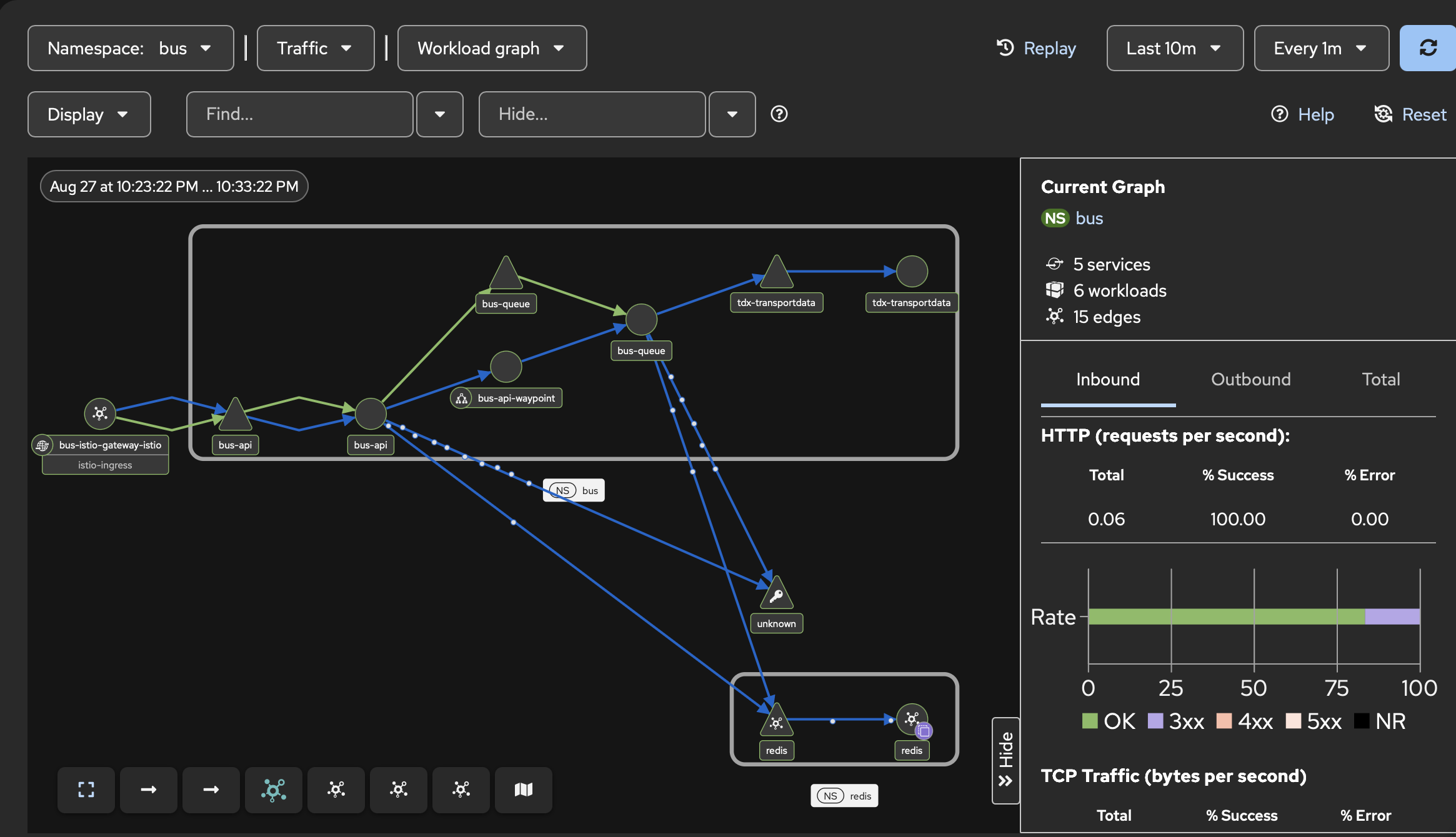
The Kiali workload graph shows the public Istio Gateway, the bus-api service-scoped waypoint, and downstream traffic to the queue and Redis workloads.
I do not expose Kiali through the public Gateway. It is an observability and control-plane tool, not an app endpoint.
Common problems
If the waypoint does not appear, I check whether Gateway API CRDs and Istio control plane synced before the application.
If the Service label exists but traffic does not look right, I check the workload’s enrollment state and any migration steps, including whether an old sidecar setup has been removed.
If Kiali shows unknown external traffic, I check whether the pod is calling a
host that does not have a matching ServiceEntry.
If a namespace is not ready for mesh traffic, I remove the ambient label from that namespace instead of trying to debug everything at once.