
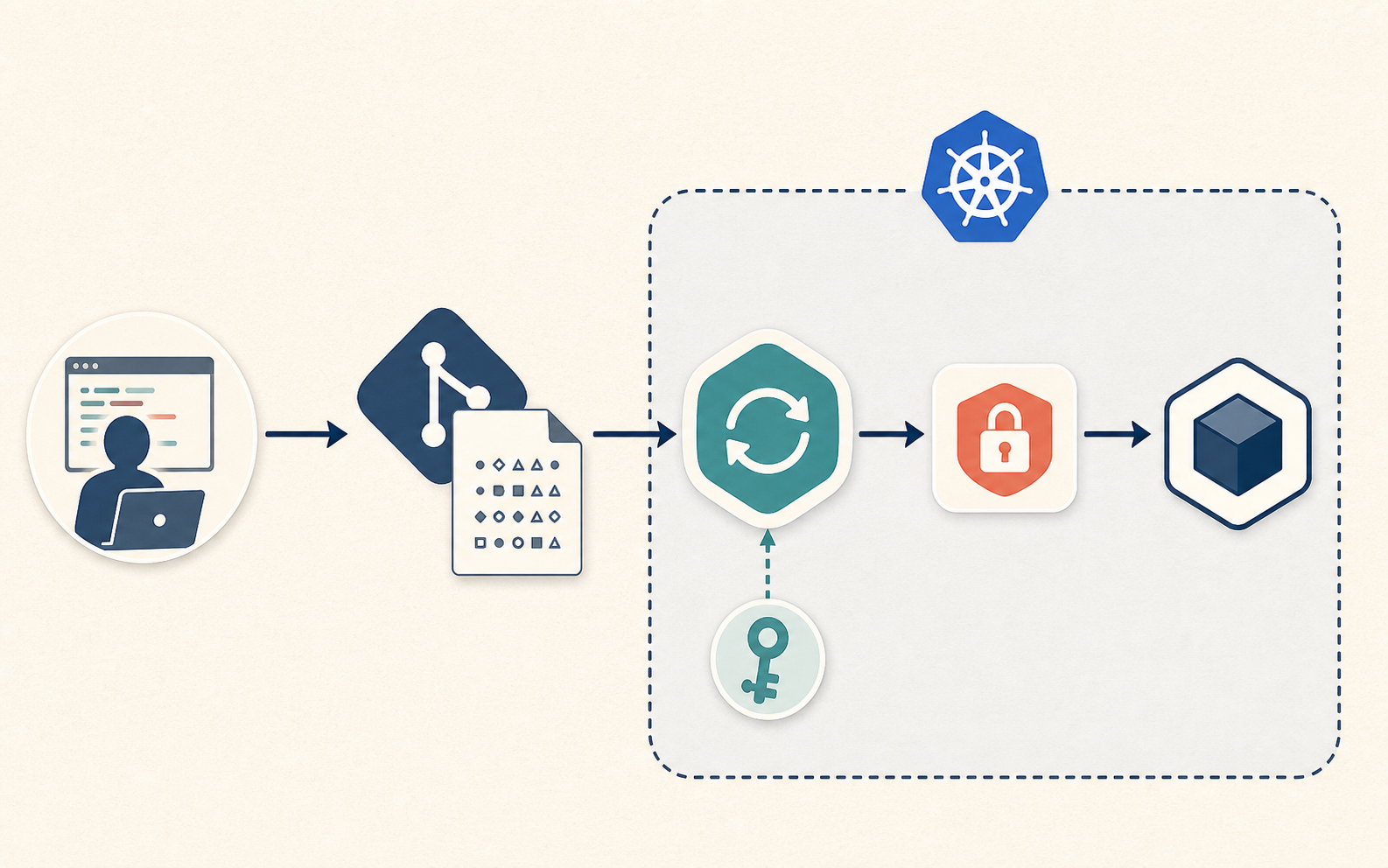
SOPS lets a GitOps repository hold encrypted Kubernetes Secret values. The controller decrypts them during deployment:
encrypted Secret in Git -> GitOps controller decrypts -> Kubernetes Secret -> Pod
Vault supplies runtime values from a secret manager; SOPS uses the encrypted files in Git as the source of truth. Choosing SOPS means protecting the decryption key alongside the infrastructure needed to rebuild the cluster.
When I would use SOPS
SOPS is useful when I want the whole application state to live in Git, including encrypted secret values.
I would use it for:
- A small cluster where running Vault is too much operational weight.
- Bootstrap secrets needed before Vault or External Secrets exists.
- App config that should be reviewed and versioned together with manifests.
- Disaster recovery where a fresh cluster can be rebuilt from Git plus one protected decryption key.
The safety model
The components have separate responsibilities:
- Git contains encrypted secret values.
- Developers encrypt with public recipients.
- The cluster stores the private decryption key.
- The GitOps controller decrypts in its manifest-processing path.
- Pods receive normal Kubernetes Secret objects.
These arrangements expose the key or decrypted values:
- the private key is committed to Git
- CI decrypts and uploads logs
- every developer has the same long-lived private key
- decrypted files are written back into the repo
- Argo CD repo-server or Redis is reachable by other workloads
SOPS protects data at rest in Git. After decryption, the normal Kubernetes Secret risks still exist. Anyone who can read Secrets in the namespace can read the value. Anyone who can exec into a pod may be able to read mounted files or environment variables. SOPS does not replace RBAC, namespace isolation, or runtime secret hygiene.
Pick age for local GitOps
SOPS supports several key backends: age, OpenPGP, AWS KMS, GCP KMS, Azure Key
Vault, and Vault transit.
For a home or small platform cluster, I usually prefer age because the model is
easy to reason about:
- public recipient: safe to put in
.sops.yaml - private identity: must be protected
- multiple recipients: useful for key rotation or break-glass access
Install the tools locally:
brew install age sops
Generate a cluster identity:
age-keygen -o cluster-age.agekey
The output contains a public recipient like this:
# public key: age1h3examplepublicrecipientxxxxxxxxxxxxxxxxxxxxxxxxxxxxxx
AGE-SECRET-KEY-1EXAMPLEPRIVATEIDENTITYXXXXXXXXXXXXXXXXXXXXXXXXXXXX
Only the public recipient belongs in Git. The private identity must be stored outside the repo.
Store the private key in the cluster
If Flux will decrypt the files, I put the age private key in the flux-system
namespace.
kubectl -n flux-system create secret generic sops-age \
  --from-file=age.agekey=./cluster-age.agekey \
  --dry-run=client -o yaml | kubectl apply -f -
Keep a protected recovery copy outside the repository before removing the
working copy. The cluster Secret must not be the only copy needed to rebuild
the cluster. Do not leave cluster-age.agekey in shared folders or CI artifacts;
file deletion alone is not a secure-erasure guarantee on every storage system.
For production, I prefer a cloud KMS or a hardware-backed secret store when it is available. With KMS, SOPS can encrypt to an identity that does not require copying a raw private key into every admin laptop.
Configure .sops.yaml
I keep the encryption policy at the root of the GitOps repo.
creation_rules:
  - path_regex: apps/.*/secrets/.*\.ya?ml$
    encrypted_regex: '^(data|stringData)$'
    age: age1h3examplepublicrecipientxxxxxxxxxxxxxxxxxxxxxxxxxxxxxx
This rule says:
- Only files under
apps/*/secrets/are matched. - Only
dataandstringDatavalues are encrypted. - Kubernetes metadata, names, labels, and Secret keys stay readable in Git.
I avoid encrypting the entire YAML file for Kubernetes manifests. GitOps diffs
are more useful when reviewers can still see that the file is a Secret named
example-api-env-file in namespace example-api, even though the values are
encrypted.
For stricter repos, I add one rule per environment:
creation_rules:
  - path_regex: clusters/prod/.*/secrets/.*\.ya?ml$
    encrypted_regex: '^(data|stringData)$'
    age: age1prodrecipientxxxxxxxxxxxxxxxxxxxxxxxxxxxxxxxxxxxxxxxx

  - path_regex: clusters/staging/.*/secrets/.*\.ya?ml$
    encrypted_regex: '^(data|stringData)$'
    age: age1stagingrecipientxxxxxxxxxxxxxxxxxxxxxxxxxxxxxxxxxxxxx
Use separate private keys and give each controller only its environment’s key. The rules alone do not isolate environments if both controllers hold both keys.
Create an encrypted Secret
I start with a normal Kubernetes Secret manifest using stringData. This keeps
the source file readable before encryption and avoids manually base64-encoding
values.
apiVersion: v1
kind: Secret
metadata:
  name: example-api-env-file
  namespace: example-api
type: Opaque
stringData:
  .env: |
    DATABASE_URL=postgres://example-api:[email protected]:5432/example_api
    REDIS_URL=redis://:[email protected]:6379/0
    JWT_SECRET=change-me
Then encrypt it:
sops --encrypt --in-place apps/example-api/secrets/env-file.yaml
After encryption, the file still looks like Kubernetes YAML, but the secret values are encrypted.
apiVersion: v1
kind: Secret
metadata:
  name: example-api-env-file
  namespace: example-api
type: Opaque
stringData:
  .env: ENC[AES256_GCM,data:...,iv:...,tag:...,type:str]
sops:
  age:
    - recipient: age1h3examplepublicrecipientxxxxxxxxxxxxxxxxxxxxxxxxxxxxxx
      enc: |
        -----BEGIN AGE ENCRYPTED FILE-----
        ...
        -----END AGE ENCRYPTED FILE-----
  encrypted_regex: ^(data|stringData)$
  version: 3.x.x
The important check is that stringData is encrypted and the plaintext values
are gone.
rg --files-with-matches "change-me|DATABASE_URL|JWT_SECRET" apps/example-api/secrets
This command should return nothing.
Apply with Flux
Flux has native SOPS support in the kustomize controller. The Kustomization references the Secret containing the decryption key.
This assumes the platform GitRepository and application manifests under
apps/example-api already exist.
apiVersion: kustomize.toolkit.fluxcd.io/v1
kind: Kustomization
metadata:
  name: example-api
  namespace: flux-system
spec:
  interval: 5m
  path: ./apps/example-api
  prune: true
  sourceRef:
    kind: GitRepository
    name: platform
  decryption:
    provider: sops
    secretRef:
      name: sops-age
This Secret holds a complete dotenv file in one .env key. Mount it as a file
and configure the application to read /etc/example-api/.env. The following
is the relevant Deployment fragment:
apiVersion: apps/v1
kind: Deployment
metadata:
  name: example-api
  namespace: example-api
spec:
  template:
    spec:
      containers:
        - name: api
          image: ghcr.io/example/example-api:1.0.0
          volumeMounts:
            - name: app-config
              mountPath: /etc/example-api
              readOnly: true
      volumes:
        - name: app-config
          secret:
            secretName: example-api-env-file
With Flux, the controller decrypts the file and applies the Secret. Kubernetes
projects its .env key into the mounted directory. envFrom would expose
individual Secret entries as environment variables; it does not parse the
lines inside a dotenv file. See using Secrets as files.
If I use Argo CD
Argo CD does not make SOPS decryption a built-in first-class feature in the same way Flux does. The common route is a config management plugin, Helm Secrets, or KSOPS.
That can work, but I treat it as a larger security decision because decryption happens in the Argo CD manifest-generation path. The decrypted manifests can touch repo-server and cache layers. If I use this pattern, I want:
- Repo-server isolated with NetworkPolicy.
- Redis protected and unreachable from application namespaces.
- Plugin image pinned and owned by the platform team.
- No decrypted manifests printed to logs.
- Argo CD RBAC locked down so not everyone can read generated manifests.
For a small cluster where SOPS is the main secret workflow, Flux is the cleaner fit. For a cluster already standardized on Argo CD, I would compare the plugin risk against the Vault and External Secrets pattern from the earlier post.
Rotate a secret value
Changing a secret value is normal GitOps:
sops apps/example-api/secrets/env-file.yaml
Edit the plaintext in the SOPS editor, save, and commit the encrypted diff.
Check that no plaintext remains and wait for Flux to reconcile the updated
Secret. The get secret command confirms that the object exists; it does not
prove that the latest values have reached the application.
rg --files-with-matches "new-plain-value" apps/example-api/secrets
kubectl -n example-api get secret example-api-env-file
Whether the workload needs a restart depends on how it reads the Secret. If the value is injected as environment variables, the pod must restart. If the Secret is mounted as files, Kubernetes updates the mounted files eventually, but the application still needs to reload them.
If the application reads the file only at startup, restart it after the updated Secret has been applied:
kubectl -n example-api rollout restart deploy/example-api
Rotate the age key
Key rotation is different from secret value rotation.
First add a new recipient to .sops.yaml:
creation_rules:
  - path_regex: apps/.*/secrets/.*\.ya?ml$
    encrypted_regex: '^(data|stringData)$'
    age: >-
      age1oldrecipientxxxxxxxxxxxxxxxxxxxxxxxxxxxxxxxxxxxxxxxxxxxx,
      age1newrecipientxxxxxxxxxxxxxxxxxxxxxxxxxxxxxxxxxxxxxxxxxxxx
Then update encrypted files so both recipients can decrypt:
sops updatekeys apps/example-api/secrets/env-file.yaml
Install the new private key in the cluster. In a controlled environment with only that key available, verify that the files decrypt; reconciliation with both keys installed does not prove the new one works.
After removing the old recipient from .sops.yaml, update every affected file
and rotate its data key:
sops updatekeys apps/example-api/secrets/env-file.yaml
sops rotate --in-place apps/example-api/secrets/env-file.yaml
updatekeys changes who can unwrap the existing data key. rotate generates
a new data key and re-encrypts the values. Without that second step, an owner
of the removed identity could recover the old data key from Git history and
use it against newer values encrypted with the same key. See the
SOPS key rotation documentation.
Commit the encrypted changes, confirm Flux reconciles with the new key, then remove the old private key from active cluster and admin storage. Protected recovery copies may still be needed for older backups. Rotation cannot revoke access to historical ciphertext or plaintext already obtained; if a credential was exposed, rotate it at its source as well.
Repository guardrails
I check for private keys and plaintext values before committing secret changes.
.gitignore:
*.agekey
*.dec.yaml
*.decrypted.yaml
.env
For a local scan, print matching filenames rather than secret-bearing lines:
rg --files-with-matches "AGE-SECRET-KEY|DATABASE_URL=|JWT_SECRET=|BEGIN OPENSSH PRIVATE KEY" .
rg returns 0 for a match and 1 for no matches. A CI wrapper must fail on
matches and handle search errors separately. This scan follows ignore rules;
use a secret scanner over tracked files in CI, since .gitignore does not stop
Git from tracking a file that was already committed.
SOPS structure check:
sops --decrypt apps/example-api/secrets/env-file.yaml >/dev/null
Encrypted value check:
yq '.stringData[".env"]' apps/example-api/secrets/env-file.yaml
That should show an ENC[...] value, not plaintext.
I also prefer branch protection for secret changes. A reviewer does not need to see the plaintext value, but they can still review:
- which namespace receives the Secret
- which Secret name changes
- which workloads consume it
- whether a new recipient was added
- whether the file matches the expected
.sops.yamlrule
SOPS or Vault
The source of truth and rotation requirements guide the choice:
- Vault is better when secrets are dynamic, centrally audited, shared across systems, or rotated by an external process.
- SOPS is better when encrypted files in Git are the desired source of truth.
- External Secrets is better when Kubernetes should sync values from an external secret manager.
- Sealed Secrets is better when I want a Kubernetes-only asymmetric encryption workflow and do not need SOPS formats or KMS integrations.
My cluster uses Vault and External Secrets for runtime values. I would use SOPS for bootstrap values or a smaller cluster where encrypted files in Git are the source of truth.