
A Deployment can look correct in a new namespace while its Pod stays in ImagePullBackOff. The Pod references regcred, but that Secret exists only in another namespace. Copying it once is easy. Repeating the copy for every workload and every credential rotation is the maintenance problem.
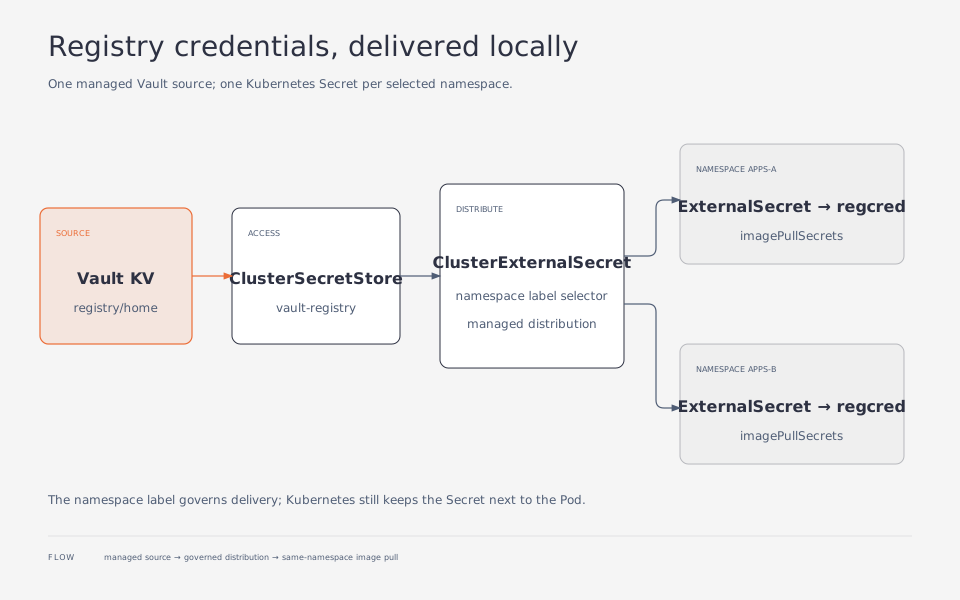
My GitOps configuration keeps Registry credentials in Vault. A ClusterExternalSecret creates an ExternalSecret in each selected namespace, and those resources produce local copies of regcred. Workloads continue to use Kubernetes’ native imagePullSecrets mechanism.
This article covers distribution and rotation. For Vault Kubernetes authentication, CA trust, and the basic ExternalSecret flow, start with Vault and External Secrets.
A local Secret in each namespace
Vault KV: registry/home → ClusterSecretStore/vault-registry
                                     ↑
ClusterExternalSecret → namespace apps-a / ExternalSecret → Secret/regcred
                      → namespace apps-b / ExternalSecret → Secret/regcred
There are still several Kubernetes Secrets; they share a managed source. Kubernetes requires an image-pull Secret to be in the same namespace as the Pod using it. Referencing default/regcred does not bypass that boundary. See the private registry guide.
Before starting, prepare:
- External Secrets Operator (ESO) with support for the example’s
external-secrets.io/v1resources. - A Vault KV v2 mount named
secretand working Kubernetes authentication. - The ESO ServiceAccount
external-secretsin the namespace of the same name. - Certificate validation for
https://vault.home.arpa, using the issuing CA certificate inexternal-secrets/vault-ca. Store the public certificate there, not the CA private key. - Node DNS and TLS access to the Registry. Secret distribution does not install a CA in the container runtime.
Store a self-contained Docker config
Use a credential restricted to the necessary pull operations, not a Registry administrator account. Prepare a protected Docker config JSON whose auths entry matches the hostname and port in the image reference, then write it to Vault:
vault kv put secret/registry/home \
  ".dockerconfigjson=@/secure/registry-pull.json"
The file must not merely point to a desktop helper through credsStore or credHelpers. Kubernetes will not invoke that helper to retrieve credentials for kubelet. When migrating an existing Secret, decode .data[".dockerconfigjson"] once; do not store that outer base64 representation as though it were the original JSON.
Give the ESO role access to one KV v2 path:
path "secret/data/registry/home" {
  capabilities = ["read"]
}
Save the policy as registry-pull-read.hcl. An authorized Vault administrator can apply it and bind it to the existing Kubernetes authentication mount:
vault policy write registry-pull-read registry-pull-read.hcl
vault write auth/kubernetes/role/external-secrets-registry \
  bound_service_account_names=external-secrets \
  bound_service_account_namespaces=external-secrets \
  audience=https://kubernetes.default.svc.cluster.local \
  policies=registry-pull-read \
  ttl=1h
The audience must match the ServiceAccount JWT requested by ESO and the cluster configuration. The Store below explicitly uses the same value in serviceAccountRef.audiences. Verify it for your environment; see ESO Kubernetes authentication for the field’s placement. Creating the role also does not configure the Kubernetes API address, CA, or TokenReview permissions needed by Vault authentication.
Separate the source from the distribution rule
This Store exposes only Registry credentials. The example adds conditions to restrict which namespaces can use it. That is an access restriction, distinct from selecting distribution targets:
apiVersion: external-secrets.io/v1
kind: ClusterSecretStore
metadata:
  name: vault-registry
spec:
  conditions:
    - namespaceSelector:
        matchLabels:
          registry.example.com/pull-credentials: enabled
  provider:
    vault:
      server: https://vault.home.arpa
      path: secret
      version: v2
      caProvider:
        type: ConfigMap
        namespace: external-secrets
        name: vault-ca
        key: ca.crt
      auth:
        kubernetes:
          mountPath: kubernetes
          role: external-secrets-registry
          serviceAccountRef:
            name: external-secrets
            namespace: external-secrets
            audiences:
              - https://kubernetes.default.svc.cluster.local
---
apiVersion: external-secrets.io/v1
kind: ClusterExternalSecret
metadata:
  name: registry-pull-credentials
spec:
  externalSecretName: regcred
  namespaceSelectors:
    - matchLabels:
        registry.example.com/pull-credentials: enabled
  refreshTime: 1h
  externalSecretSpec:
    refreshPolicy: Periodic
    refreshInterval: 2m
    secretStoreRef:
      name: vault-registry
      kind: ClusterSecretStore
    target:
      name: regcred
      creationPolicy: Owner
      template:
        engineVersion: v2
        type: kubernetes.io/dockerconfigjson
    data:
      - secretKey: .dockerconfigjson
        remoteRef:
          key: registry/home
          property: .dockerconfigjson
The refresh settings have different responsibilities. refreshTime periodically checks the namespace-level ExternalSecrets. refreshInterval controls how often each ExternalSecret fetches from Vault. Neither is an end-to-end delivery SLA; controller, provider, or network failures can delay synchronization. The ClusterExternalSecret reference defines the two fields.
Treat the namespace label as part of authorization
Only namespaces intended to receive the credential get the label:
apiVersion: v1
kind: Namespace
metadata:
  name: apps-a
  labels:
    registry.example.com/pull-credentials: enabled
The ClusterExternalSecret selector only controls where that controller creates resources. It does not prevent someone from creating an ExternalSecret that directly references the Store. Use Store conditions, restrict changes to namespace labels, and control who may create ExternalSecrets. The ClusterSecretStore reference describes the conditions.
Someone allowed to create Pods in an authorized namespace may also mount and read its Secrets without direct get secrets permission. Share credentials only within the same trust boundary. Different tenants or repository permissions call for separate credentials, Stores, and selectors rather than one broadly privileged shared account.
The Pod still needs imagePullSecrets
Creating a Secret does not modify Deployments. Reference it in the Pod template or a controlled ServiceAccount. This short-lived test Pod requires an image that actually exists in your Registry and supports the command shown:
apiVersion: v1
kind: Pod
metadata:
  name: registry-pull-check
  namespace: apps-a
spec:
  restartPolicy: Never
  imagePullSecrets:
    - name: regcred
  containers:
    - name: check
      image: registry.home.arpa:5000/examples/pull-check:tested
      imagePullPolicy: Always
      command: ["/bin/sh", "-c", "true"]
Wait for both reconciliation layers before creating the Pod:
kubectl get clustersecretstore vault-registry
kubectl get clusterexternalsecret registry-pull-credentials
kubectl -n apps-a wait --for=condition=Ready externalsecret/regcred --timeout=120s
kubectl -n apps-a get secret regcred \
  -o jsonpath='{.type}{"\n"}'
kubectl apply -f registry-pull-check.yaml
kubectl -n apps-a describe pod registry-pull-check
The Secret type should be kubernetes.io/dockerconfigjson. Pod Events should confirm a successful image pull. Always makes the runtime check the image, but cached layers may still be reused. A node with another Registry credential can also succeed without proving that regcred was used. For a strict test, exclude alternative credential sources or check the identity in Registry access records. Delete the diagnostic Pod afterward.
Rotate with an overlap period
For a planned rotation:
- Create a new restricted pull credential in the Registry while the old one remains valid.
- Update the same
.dockerconfigjsonproperty in Vault. - Check Ready conditions, refresh times, and errors for each target ExternalSecret, not merely the existence of the ClusterExternalSecret.
- Verify actual pulls with new Pods after every target namespace has updated.
- Revoke the old credential at the Registry.
Updating a pull Secret does not restart running containers. It is also different from reloading an application secret supplied through environment variables. During an exposure incident, immediate revocation may take priority over availability; new Pods may temporarily fail to pull images.
Removing a namespace label or deleting the ClusterExternalSecret may clean up owned ExternalSecrets and their Secrets. With creationPolicy: Owner, label removal is not a “stop refreshing but retain the data” switch. If an ExternalSecret with the same name already exists, establish its ownership before migrating it rather than overwriting it.
Each ExternalSecret refreshes independently from Vault. As the namespace count grows, monitor ESO and Vault load for delays or failed refreshes.