
My k8s_infra setup originally used Caddy as a local web reverse proxy.
External requests reached Cloudflare first, entered my home network through
forwarded HTTP or HTTPS ports, arrived at Caddy, and were finally sent to
Kubernetes.
That design worked, but it still required a public entry point into my home network. Even with Cloudflare proxying, TLS, and firewall rules, the origin had to listen on an inbound port. I also had to maintain another layer for Caddy routing and TLS termination.
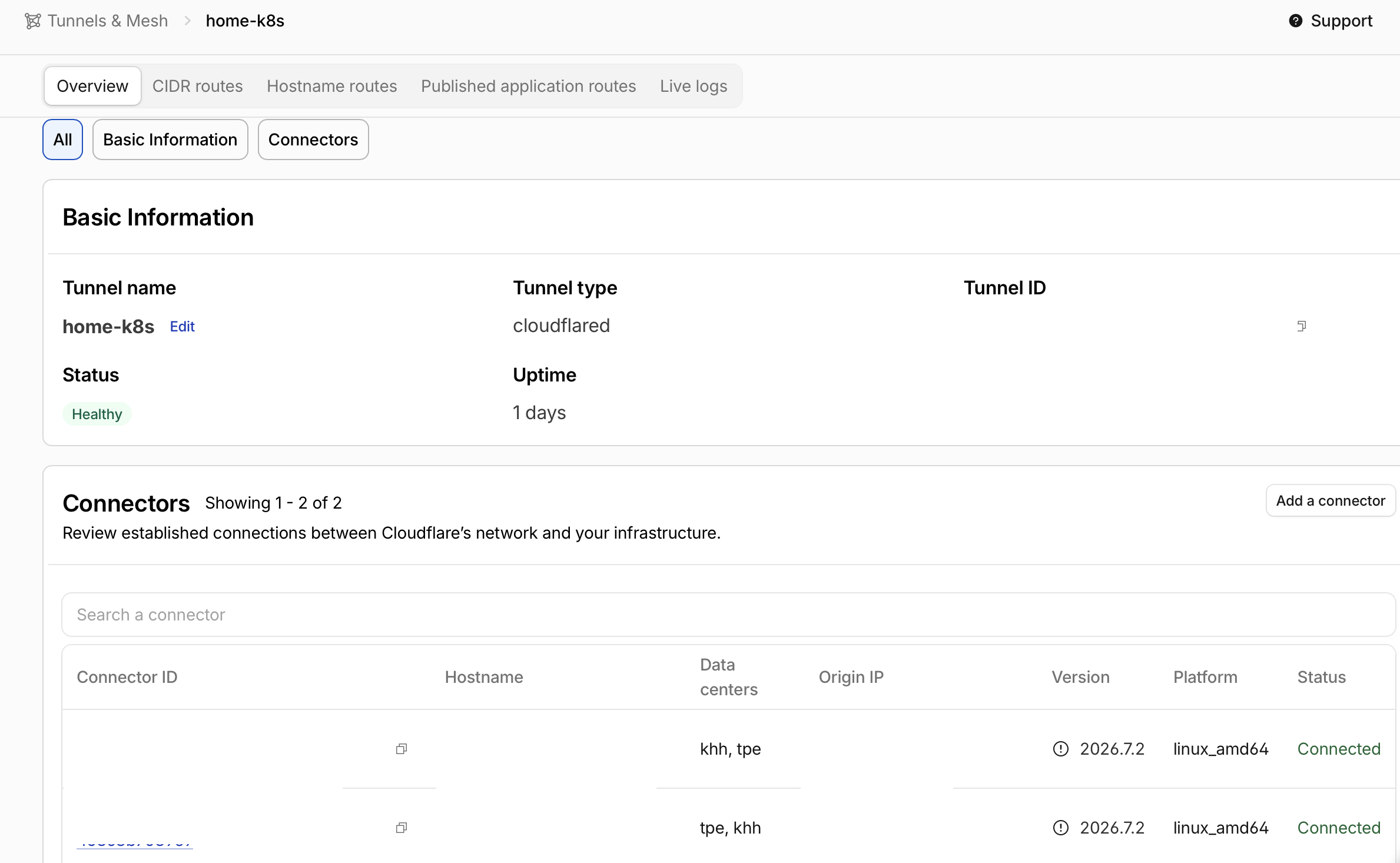
I have now replaced that path with cloudflared running inside Kubernetes. The
connector initiates a Tunnel to Cloudflare, Cloudflare Access authenticates the
user, and approved requests travel through the existing Tunnel connection into
the cluster. My router no longer forwards ports 80 or 443 to the local
server, and Caddy is no longer required for public web traffic.
The new request path is:
browser
  -> Cloudflare Access
  -> Cloudflare edge
  -> outbound Cloudflare Tunnel
  -> cloudflared Pod
  -> Kubernetes ClusterIP Service
  -> application Pod
Cloudflare Tunnel uses connections initiated by the origin. The origin does not
need a public IP or an open inbound port. That change in connection direction
is the most important security boundary in this migration. Cloudflare’s
Tunnel overview and
firewall guide
also describe blocking ingress while allowing the outbound connections needed
by cloudflared.
The original Caddy path
The old architecture looked roughly like this:
browser -> Cloudflare -> router 80/443 -> Caddy -> NodePort/Service -> Pod
Caddy handled TLS termination, hostname routing, and reverse proxying. This is a straightforward design and works well for services on a single host. In my home Kubernetes environment, however, it meant maintaining all of these pieces:
- Port-forwarding rules on the router.
- Inbound rules on the host firewall.
- Hostnames and upstreams in the Caddy configuration.
- A NodePort, Ingress, or another Kubernetes entry point.
- Cloudflare DNS records and Access policies.
A mistake in any of those layers could leave the origin directly reachable and allow a request to bypass the authentication path I expected Cloudflare to enforce.
With Tunnel, the public entry point exists only at Cloudflare. Because
cloudflared runs inside the cluster, it can resolve Kubernetes Service names
directly. The request no longer needs to leave the cluster and return through a
NodePort.
Outbound access is still required
The origin no longer needs inbound HTTP or HTTPS ports, but cloudflared still
needs outbound network access. The Cloudflare firewall documentation specifies
TCP/UDP port 7844 for Tunnel egress, using HTTP/2 or QUIC respectively.
Run cloudflared inside Kubernetes
I run the connector in a dedicated cloudflare namespace and start two
replicas for the same Tunnel:
apiVersion: apps/v1
kind: Deployment
metadata:
  name: cloudflared
  namespace: cloudflare
spec:
  replicas: 2
  strategy:
    type: RollingUpdate
    rollingUpdate:
      maxUnavailable: 0
      maxSurge: 1
  selector:
    matchLabels:
      app.kubernetes.io/name: cloudflared
  template:
    metadata:
      labels:
        app.kubernetes.io/name: cloudflared
    spec:
      containers:
        - name: cloudflared
          image: cloudflare/cloudflared:<pinned-version>
          args:
            - tunnel
            - --no-autoupdate
            - --loglevel
            - info
            - --metrics
            - 0.0.0.0:2000
            - run
          env:
            - name: TUNNEL_TOKEN
              valueFrom:
                secretKeyRef:
                  name: cloudflared-token
                  key: token
          readinessProbe:
            httpGet:
              path: /ready
              port: 2000
          securityContext:
            allowPrivilegeEscalation: false
            capabilities:
              drop: ["ALL"]
            readOnlyRootFilesystem: true
            runAsNonRoot: true
            seccompProfile:
              type: RuntimeDefault
Both replicas use the same Tunnel token. Their purpose is connector
availability; they do not automatically give the Kubernetes Services or
applications a complete load-balancing and disaster-recovery design. The
Cloudflare
Kubernetes deployment guide
also describes additional cloudflared replicas as a high-availability
mechanism.
I pin the container image and use --no-autoupdate. This keeps version changes
inside the normal GitOps review and Argo CD rollout process instead of allowing
the container to update itself.
A PodDisruptionBudget keeps at least one connector available during voluntary disruptions. It does not help when both replicas share a failed node, network, or upstream, so scheduling and failure-domain checks still matter.
apiVersion: policy/v1
kind: PodDisruptionBudget
metadata:
  name: cloudflared
  namespace: cloudflare
spec:
  minAvailable: 1
  selector:
    matchLabels:
      app.kubernetes.io/name: cloudflared
Keep the Tunnel token out of Git
The Tunnel token can start a connector, so I treat it as a sensitive credential. I do not place the token directly in the Deployment or commit it as plaintext. Terraform obtains the token, I store it in Vault, and External Secrets creates the Kubernetes Secret consumed by the Pod:
Terraform output
  -> Vault KV
  -> ExternalSecret
  -> Secret/cloudflared-token
  -> cloudflared Pod
Passing the token through Terraform also makes Terraform state and saved plan
files sensitive. Marking an output as sensitive hides it from normal CLI
output, but does not remove it from state. The state therefore needs protected
storage, encryption, and access controls, and state or plan artifacts must not
be published. HashiCorp’s
sensitive-data guidance
documents this distinction.
A simplified ExternalSecret looks like this:
apiVersion: external-secrets.io/v1
kind: ExternalSecret
metadata:
  name: cloudflared-token
  namespace: cloudflare
spec:
  refreshInterval: 2m
  secretStoreRef:
    name: vault-cloudflare
    kind: ClusterSecretStore
  target:
    name: cloudflared-token
    creationPolicy: Owner
  data:
    - secretKey: token
      remoteRef:
        key: cloudflare/cloudflared
        property: token
The corresponding ClusterSecretStore reaches Vault through an internal HTTPS
name and validates the private CA through caProvider. Git contains the public
CA certificate and secret mapping, not the CA private key or Tunnel token.
If the token is exposed, rotate it and force-disconnect all existing Tunnel
connections, as Cloudflare’s token guidance
requires. Rotation alone blocks new connections with the old token; existing
connectors remain active. This causes an outage until trusted replicas reconnect:
update Vault, wait for External Secrets to refresh the Kubernetes Secret, then
roll out the cloudflared Pods so their environment variables load the new token.
Deleting a leaked string from Git does not revoke it.
Manage the Tunnel and hostnames with Terraform
I use a remotely managed Tunnel. Kubernetes is responsible for running the connector, while Terraform manages the Tunnel, DNS records, hostname routes, and Cloudflare Access applications.
Each route maps a public hostname to a Service that the connector can reach:
locals {
  tunnel_routes = {
    argocd = {
      hostname         = "argocd.example.com"
      service          = "http://argocd-server.argocd.svc.cluster.local:80"
      access_aud_tags  = local.access_aud_tags.argocd
      http_host_header = "argocd.example.com"
      no_tls_verify    = false
      manage_dns       = true
    }

    kiali = {
      hostname         = "kiali.example.com"
      service          = "http://kiali.istio-system.svc.cluster.local:20001"
      access_aud_tags  = local.access_aud_tags.kiali
      http_host_header = "kiali.example.com"
      no_tls_verify    = false
      manage_dns       = true
    }
  }
}
The service field uses a full Kubernetes Service DNS name. Internal UIs such
as Argo CD, Kiali, Airflow, and Longhorn can remain ClusterIP Services without
a public LoadBalancer or NodePort.
The HTTP Argo CD origin assumes argocd-server is configured to serve HTTP,
for example with server.insecure: "true" in argocd-cmd-params-cm. Its default
port 80 behavior redirects to HTTPS and can cause a redirect loop with this
route. Keep this HTTP hop on a controlled internal path, or use an HTTPS origin
with certificate validation. no_tls_verify=false does not encrypt an HTTP
URL. See Argo CD ingress configuration.
The Tunnel ingress configuration is generated from this route map and always ends with a catch-all 404 rule:
resource "cloudflare_zero_trust_tunnel_cloudflared_config" "home_k8s" {
  account_id = var.cloudflare_account_id
  tunnel_id  = cloudflare_zero_trust_tunnel_cloudflared.home_k8s.id
  source     = "cloudflare"

  config = {
    ingress = concat(
      [
        for route_name in sort(keys(local.tunnel_routes)) : {
          hostname = local.tunnel_routes[route_name].hostname
          service  = local.tunnel_routes[route_name].service

          origin_request = {
            http_host_header = local.tunnel_routes[route_name].http_host_header
            no_tls_verify    = local.tunnel_routes[route_name].no_tls_verify
            access = length(local.tunnel_routes[route_name].access_aud_tags) > 0 ? {
              required  = true
              team_name = var.cloudflare_access_team_name
              aud_tag   = local.tunnel_routes[route_name].access_aud_tags
            } : null
          }
        }
      ],
      [
        {
          hostname       = null
          service        = "http_status:404"
          origin_request = null
        }
      ]
    )
  }
}
The catch-all matters. A hostname without an explicit route should not fall through to an accidental default backend.
The DNS record for each published hostname points to:
<tunnel-uuid>.cfargotunnel.com
It does not point to my home public IP, so DNS does not reveal an HTTP or HTTPS origin endpoint that can be contacted directly.
If a hostname already has a DNS record, import that record into the matching
Terraform resource before changing its target. The destination instance must
exist in the configuration: if manage_dns controls count or for_each,
enable it for that record before import, but do not apply a creation plan.
Match the existing record’s settings and review the import plan, then change
the CNAME target in a separate reviewed plan. HashiCorp’s
import guide
explains resource addresses and imports into count or for_each instances.
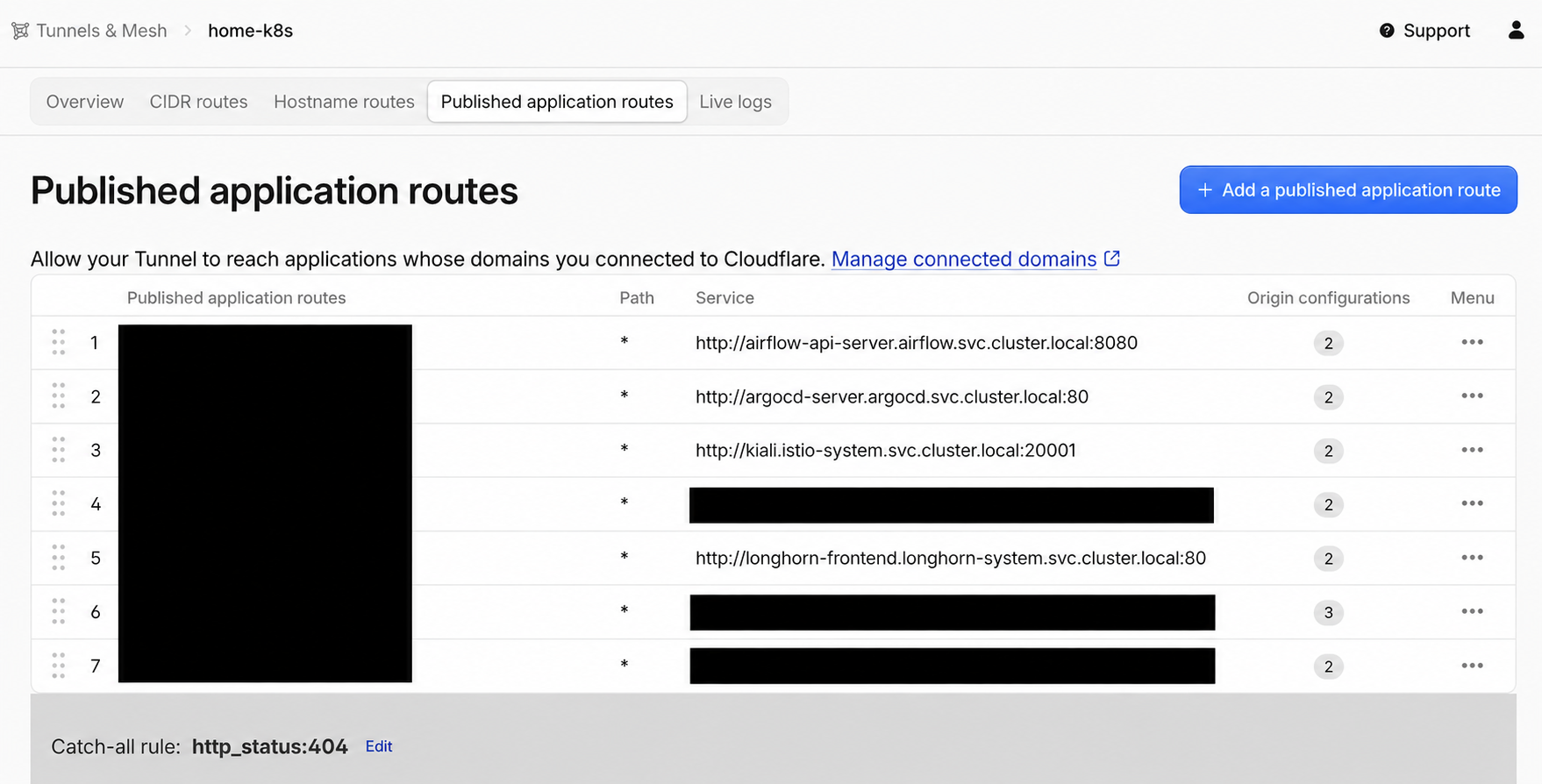
Cloudflare lists the published application routes for the Tunnel. Each hostname is explicitly mapped to an internal origin, and unmatched hostnames end at the catch-all http_status:404 rule.
Authenticate at Cloudflare Access
I want management interfaces such as Argo CD, Kiali, Grafana, and Longhorn to authenticate users before a request reaches the local service.
Each hostname therefore has a corresponding Cloudflare Access application and allow policy. When a user opens one of these URLs, the flow is:
- Cloudflare Access verifies the user’s identity and evaluates the policy.
- After approval, Cloudflare attaches an Access JWT to the request.
cloudflaredvalidates the JWT against the AUD configured for the route.- Only a successfully validated request is forwarded to the origin Service.
Setting access.required = true and supplying the correct aud_tag makes the
connector verify that the token belongs to the expected Access application. In
my Terraform model, an empty access_aud_tags list means that a route is
intentionally public. Internal management UIs must never be left with an empty
list by accident.
Cloudflare Access is still an identity-aware outer gate, not a replacement for application authorization. Argo CD, Grafana, and other applications should keep appropriate accounts, RBAC, and session controls. Edge authentication and application authorization are separate layers.
Cloudflare documents this origin-side check in its
Access settings for Tunnel origins:
cloudflared validates the Cf-Access-Jwt-Assertion header before proxying the
request. Protecting a hostname with an Access application at the edge and
enabling this connector-side validation are related but distinct controls.
Migration order
I did not turn off Caddy at the start. I first built and verified the new path:
- Create the Tunnel and Access applications with Terraform.
- Store the Tunnel token in Vault.
- Let External Secrets create
cloudflared-token. - Deploy two
cloudflaredPods through Argo CD. - Add one low-risk hostname and verify Access, JWT validation, and Service routing.
- Move the existing hostnames to the Tunnel one at a time.
- Test each service from an external network and confirm that unauthenticated requests cannot reach the origin.
- Confirm that every production hostname has stopped using Caddy.
- Remove router port forwarding and inbound firewall rules for
80and443. - After confirming that it has no other role, disable Caddy as the public reverse proxy.
This sequence preserves a rollback path. A broken Tunnel configuration does not affect the old entry point before DNS is switched. The old route is closed only after the replacement has been verified, avoiding a migration that loses both paths at once.
What I verify after the migration
I validate the result from inside the cluster, from the LAN, and from an external network.
First, I check the connector and secret state:
kubectl -n cloudflare get deployment,pod,poddisruptionbudget
kubectl -n cloudflare get externalsecret
kubectl get clustersecretstore vault-cloudflare
kubectl -n cloudflare logs deployment/cloudflared --tail=100
Then I confirm that origin Services remain internal:
kubectl get service --all-namespaces
kubectl get gateway,httproute --all-namespaces
Finally, I test from a network outside my home LAN:
- An unauthenticated request reaches Cloudflare Access, not the application.
- An account that does not match the allow policy is rejected.
- Hostnames, redirects, WebSockets, and callback URLs work after login.
- Ports
80and443on my home public IP are unreachable from the Internet. - New requests continue through the second replica when one
cloudflaredPod is stopped. - An unconfigured hostname returns 404 instead of reaching another service.
A Running status on the cloudflared Pods is not enough. The migration is
complete only when the old inbound path is closed and every management UI is
actually protected by its Access policy.
Risks that still remain
The Tunnel token is still a privileged credential
Someone with a valid token may be able to start an unauthorized connector. The token should not appear in Git, shell history, CI logs, or Terraform plan artifacts, and it needs a tested rotation procedure.
Cluster networking determines what cloudflared can reach
Because the cloudflared Pods run inside the cluster, they can usually resolve
and contact many Services. NetworkPolicy should restrict them to the namespaces
and ports that the Tunnel is intended to publish. This limits lateral movement
if the connector is compromised.
Internal HTTP is not safe in every environment
The Tunnel protects the path between the Cloudflare edge and the connector, but the connector-to-origin hop may still use HTTP. In a less trusted environment, across unencrypted node networks, or under compliance requirements, I would add Istio mTLS or use an HTTPS origin rather than assume that all in-cluster traffic is safe.
The original client IP needs explicit handling
The origin normally sees the connector as its direct network peer, not the user’s original IP address. If an HTTP application uses client IPs for audit logs, rate limits, or security decisions, it must consume the correct Cloudflare header through a trusted proxy chain. The application must not trust the same header from arbitrary, untrusted sources.
Cloudflare becomes an entry-point dependency
Access, DNS, Tunnel, and the Cloudflare edge are all part of the remote access
path. I keep a restricted LAN or VPN maintenance path so I am not completely
locked out when Cloudflare or the Internet is unavailable. That recovery path
does not reopen public ports 80 or 443.