
cloud

Remove an accidentally committed secret from Git—locally and remotely

Deleting the file is only the first step: rotate the credential, rewrite every reachable ref, verify the remote independently, and prevent the next leak.

This incident started with an ordinary side-project task. The project consumed several CSV files from external sources, and some of those files contained confidential data that should never have been versioned. While preparing the data for the project, I accidentally added one of the sensitive CSV files to the Git repository without noticing.

The mistake was simple, but fixing it was not. By the time I found it, removing the CSV in a new commit would only hide it from the latest version of the project. The earlier Git object could still be reachable locally and remotely.

Committing a secret or confidential file to Git creates two separate problems.

The first is exposed data. If the file contains a credential, that credential must be revoked or rotated because someone may already have copied it. If it contains non-revocable confidential data, repository access, audit logs, cached copies, and any required incident notifications must be handled explicitly.

The second is an exposed Git object. Deleting the file in a new commit does not remove its older versions from branches, tags, remote refs, forks, cached views, or existing clones.

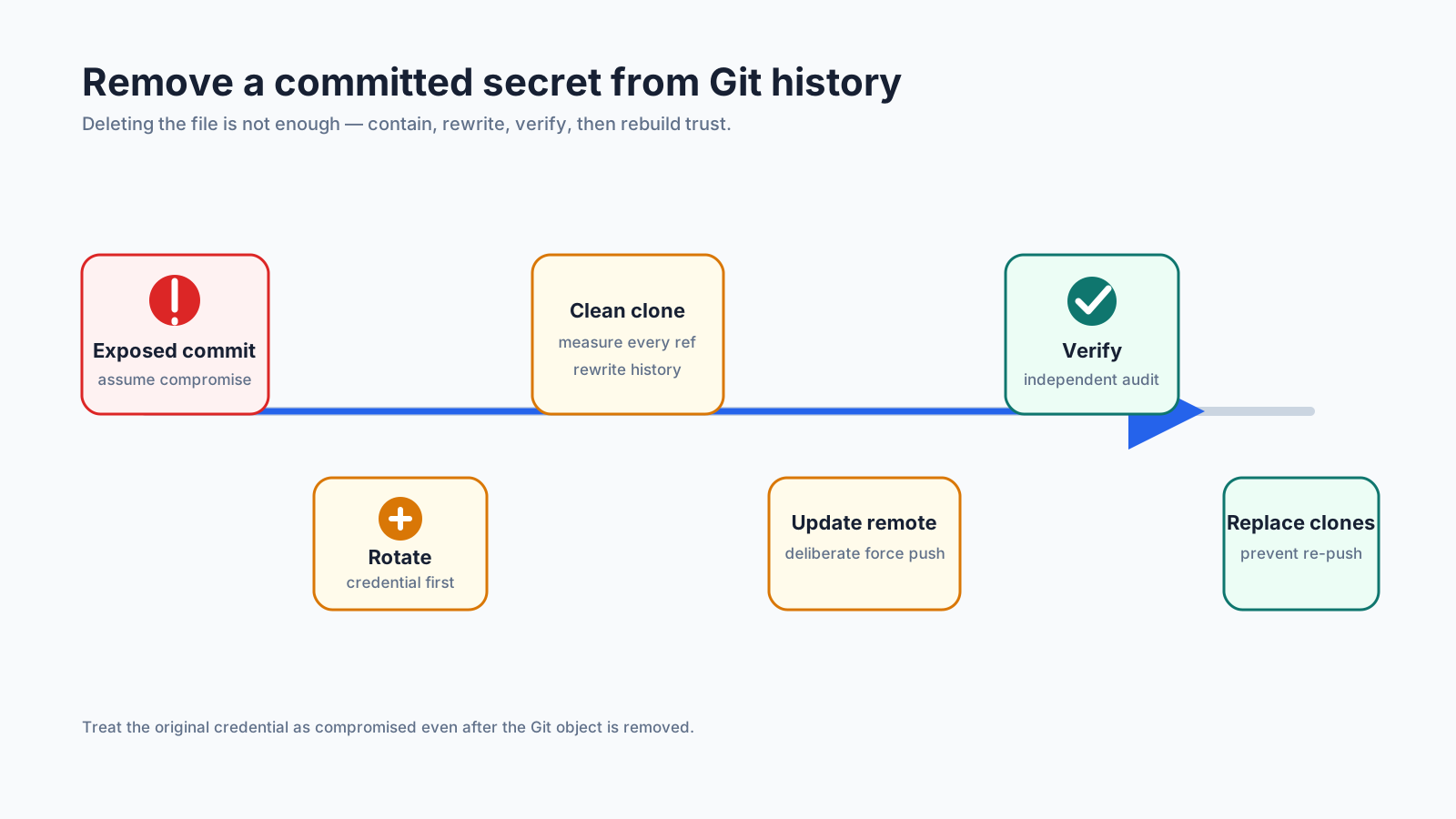
I learned to treat cleanup as an incident rather than as a normal code change:

contain -> rotate -> rewrite -> publish -> verify -> prevent

This post uses a fictional file named data/external/private-source.csv. The commands are examples, not a substitute for checking the refs, branch-protection rules, and collaboration workflow of a real repository.

What deleting the file actually does

Suppose I make this commit:

git rm data/external/private-source.csv
git commit -m "remove committed confidential CSV"

The current branch no longer contains the file, but an earlier commit still does. Anyone who can reach that commit can recover the old content.

The same problem applies if I replace the value with REDACTED. Git stores the new version while preserving the previous blob in history.

That means these actions are useful but insufficient:

  • deleting the file
  • adding the path to .gitignore
  • closing the merge request
  • making the repository private
  • force-pushing only the current branch

They reduce future exposure, but they do not invalidate a credential or prove that the old object is gone.

Step 1: contain the incident

Before rewriting Git history, I stop the credential from being useful.

  1. Revoke or rotate the exposed token, password, key, or certificate.
  2. Check the provider’s access and audit logs for unexpected use.
  3. Temporarily restrict repository access if the exposure is still active.
  4. Ask collaborators to pause pushes until the rewrite is complete.
  5. Identify every path and filename that has contained the secret.

Rotation comes first because history cleanup cannot make an exposed credential secret again. Copies may already exist in CI logs, build artifacts, package caches, forks, backups, chat messages, or another developer’s clone.

If the file contained multiple credentials, I rotate all of them. If the same credential was reused elsewhere, I treat those systems as part of the incident too.

Step 2: measure the exposure

I first look for commits that changed the problematic path:

git log --all --name-status -- data/external/private-source.csv

Then I check which reachable objects are associated with that path:

git rev-list --objects --all | rg ' data/external/private-source\.csv$'

If the file was renamed or moved, I repeat the search for every previous path. I also inspect branches and tags rather than assuming main is the only ref that matters:

git branch --all --contains <commit>
git tag --contains <commit>
git for-each-ref --contains <commit>

For a secret that appeared as a string inside an otherwise valid file, a path search is not enough. I search history for a safe, distinctive fragment such as a key identifier—not the full secret:

git log -S'<safe-identifier>' --all -p

I record the affected paths, first affected commits, and known blob IDs in a private incident note. Those IDs become useful verification targets after the rewrite.

Step 3: rewrite a fresh clone

History rewriting is destructive. I use a fresh clone so that unrelated local work, stashes, and reflogs are not mixed into the cleanup.

The Git project recommends git-filter-repo instead of the older git filter-branch workflow. For a file that should disappear from all rewritten history, the central operation is:

git filter-repo \
  --sensitive-data-removal \
  --invert-paths \
  --path data/external/private-source.csv

I add another --path for every previous filename:

git filter-repo \
  --sensitive-data-removal \
  --invert-paths \
  --path data/external/private-source.csv \
  --path imports/private-source.csv

If only one value inside a file must be replaced, --replace-text is a better fit than removing the entire path. I build that replacement file offline and avoid putting the original secret in shell history, terminal recordings, or CI logs.

I do not add --force by habit. git-filter-repo has a fresh-clone safety check because rewriting the wrong repository can irreversibly destroy local history.

Some older environments only have git filter-branch. It can perform a path rewrite, but it is slower, easier to misuse, and leaves more cleanup work around backup refs and reflogs. I treat it as a constrained fallback, not the default recommendation.

Step 4: verify the rewritten local history

I do not judge success from the command’s exit code alone.

The path should no longer appear in reachable history:

git log --all -- data/external/private-source.csv
git rev-list --objects --all | rg ' data/external/private-source\.csv$'

Both commands should return no matching history.

If I recorded an exposed blob ID before rewriting, Git should no longer be able to resolve it:

git cat-file -e <exposed-blob-id>

For a removed object, this command should fail. If it succeeds, a ref or local object database still retains the object and I investigate before publishing the rewritten history.

I also run the project’s normal tests and build. A path rewrite can remove a file that the application, deployment manifests, or CI pipeline still expects. The replacement should already come from environment variables, a secret manager, SOPS, Vault, or the deployment platform—not another plaintext file in Git.

Step 5: update the remote deliberately

Rewriting commits creates new commit IDs. Publishing the result therefore requires a coordinated force update.

Before doing this, I check:

  • everyone has stopped pushing
  • important unmerged work has been preserved
  • branch protection temporarily permits the planned update
  • I know which branches, tags, merge-request refs, and server-side caches exist
  • the hosting provider’s sensitive-data removal procedure is understood

A mirror force push can replace all normal refs:

git push --force --mirror origin

This command is intentionally dangerous. It can overwrite branches and tags or discard work pushed after the cleanup began. I only use it from the reviewed, rewritten clone during a maintenance window.

Repository hosting platforms may keep refs that a normal push cannot update, including merge-request or pull-request refs. They may also retain cached diffs, forks, LFS objects, or server backups. Those require the provider’s cleanup process; rewriting and pushing the visible branches is not proof that every server-side copy has disappeared.

On current GitLab versions, ordinary file purging and sensitive-data removal are different maintenance operations. For passwords or keys, GitLab directs owners to Remove blobs or Redact text under Repository maintenance, followed by housekeeping and pruning unreachable objects. A rewritten force push by itself does not prove that GitLab’s cached or internal copies have been removed.

Step 6: audit the remote independently

The most important lesson from my cleanup was to report local and remote status separately.

After publishing the rewrite, I create a new mirror clone from the server rather than trusting the cleaned working copy:

git clone --mirror <repository-url> remote-audit.git
cd remote-audit.git

Then I repeat the same checks against what the server actually exposes:

git log --all -- data/external/private-source.csv
git rev-list --objects --all | rg ' data/external/private-source\.csv$'
git cat-file -e <exposed-blob-id>

My result should read like this:

  • Local: the path and exposed blob are not reachable from local refs.
  • Remote: a fresh mirror clone cannot reach the path or exposed blob from server-advertised refs.
  • Exposure: revocable credentials are dead, and non-revocable confidential data has been handled through the appropriate incident process.
  • External copies: forks, caches, artifacts, and other clones have been handled or explicitly recorded as remaining risk.

This avoids the misleading conclusion that “the repository is safe” when only one clone has been cleaned.

Step 7: clean or replace old clones

An old clone can reintroduce the contaminated history with a later push. The safest collaboration rule is usually:

  1. Stop using pre-rewrite clones.
  2. Preserve unpushed patches separately.
  3. Clone the cleaned remote again.
  4. Reapply the patches onto the new history.

Trying to repair every existing clone is possible, but it is easy to retain old tags, reflogs, stashes, or private branches. If an old clone must be kept, its owner has to remove old refs, expire reflogs, prune unreachable objects, and verify the known bad IDs before it is allowed to push again.

git reflog expire --expire=now --all and git gc --prune=now can permanently remove recovery history, including useful stashes. I never present them as routine housekeeping commands; they belong in a deliberate cleanup with a verified target and preserved work.

Step 8: prevent the next secret leak

History rewriting is expensive, so I add several independent guardrails.

Ignore local secret files

.env
.env.*
!.env.example
*.p8
*.p12
*.pem
*.key
*.mobileprovision

.gitignore only prevents untracked files from being added accidentally. It does not remove files that Git already tracks, and it does not detect a secret pasted into source code.

Check tracked filenames in CI

A repository-specific check can reject known dangerous paths before deployment:

git ls-files | rg '(^|/)(\.env($|\.)|.*\.(p8|p12|pem|key|mobileprovision)$)'

The real check needs an allowlist for safe templates such as .env.example and test fixtures. I make the CI job fail when a forbidden tracked path appears.

Scan content as well as filenames

Secret scanners can catch token formats, private-key headers, entropy-heavy values, and provider-specific credentials. I run them in pre-commit or pre-push hooks and again in CI, because local hooks can be bypassed.

False positives should be reviewed and allowlisted narrowly. Disabling a rule for an entire repository turns the scanner into decoration.

Keep secrets outside Git

For runtime values I prefer a secret manager. If encrypted values must be versioned, I use an explicit tool and key-management model such as the one in my SOPS and GitOps article. For Kubernetes workloads that read from a runtime source, I use the Vault and External Secrets pattern.

Neither approach removes the need for review: an encrypted file committed together with its decryption key is still a plaintext-secret incident in practice.

A cleanup checklist

Before closing the incident, I want every answer to be explicit:

  • Every revocable credential was revoked or rotated.
  • Non-revocable confidential data was handled under the appropriate incident and notification process.
  • Provider audit logs were reviewed.
  • Every historical path was identified.
  • Branches, tags, and other refs were included in the rewrite.
  • The rewritten local history no longer contains the path.
  • Known exposed blob or commit IDs no longer resolve locally.
  • Application tests and deployment checks pass without the deleted file.
  • The rewritten refs were published in a coordinated maintenance window.
  • A fresh mirror clone independently passed the remote audit.
  • Hosting-provider caches, hidden refs, forks, and LFS objects were handled.
  • Old developer clones were replaced or carefully cleaned.
  • .gitignore, tracked-file checks, and content scanning were added.
  • The replacement secret-delivery path is documented.

Conclusion

The key distinction is simple:

deleting a file changes the current tree

rewriting and verifying history changes which old objects remain reachable

Neither action invalidates a copied credential. Rotation handles the security boundary; history rewriting reduces residual exposure; independent local and remote audits prove what each repository still serves.

That is why I no longer call the work finished after one successful force push. I close the incident only when the credential is dead, the local refs are clean, the remote has been cloned and checked independently, old clones cannot recontaminate it, and guardrails make the same mistake harder to repeat.

References