
我的 k8s_infra 原本由 Caddy 接收公開流量。請求先到 Cloudflare,再經過 router 上的 HTTP/HTTPS port forwarding 進入家用網路,抵達 Caddy 後才轉送到 Kubernetes。
這套設計可以運作,卻代表來源端仍要接受 Internet 的入站連線。我除了維護 Cloudflare DNS 與 Access policy,還要同時管理 router、host firewall、Caddy route,以及 Kubernetes 的 NodePort 或 Ingress。任何一層設定錯誤,都可能留下繞過預期驗證路徑的入口。
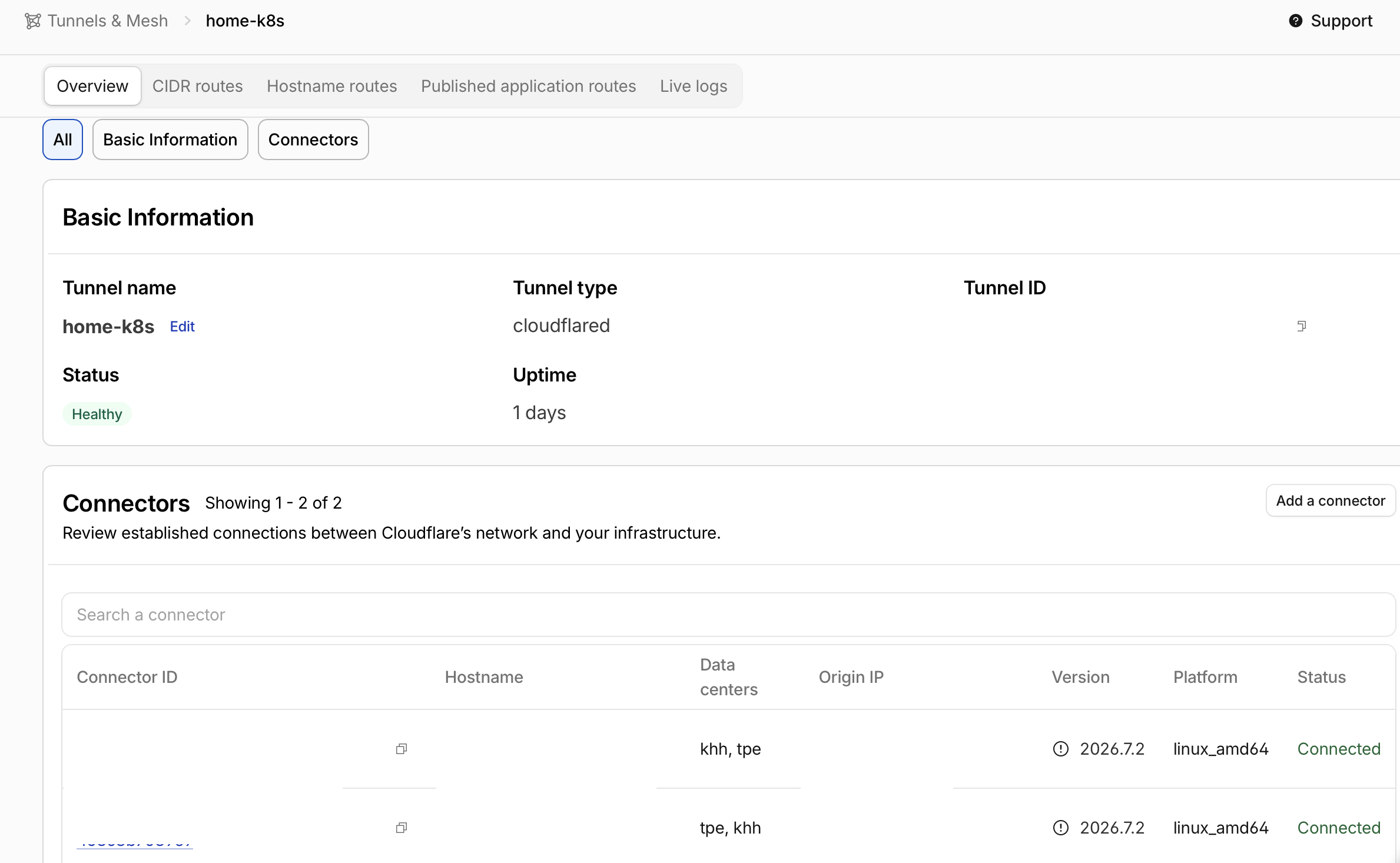
現在我改成在 Kubernetes 裡執行 cloudflared:connector 主動連線至 Cloudflare,Cloudflare Access 先驗證使用者,通過的請求才沿著既有 Tunnel 連線抵達叢集內的 Service。
瀏覽器
  → Cloudflare Access
  → Cloudflare edge
  → outbound Cloudflare Tunnel
  → cloudflared Pod
  → Kubernetes ClusterIP Service
  → application Pod
Router 不再把 80、443 轉送到家中主機,Caddy 也不再負責公開 web traffic。
「不開放連接埠」的實際範圍
舊架構接受來自 Internet 的入站連線:
Internet → public 80/443 → Caddy → Kubernetes
新架構則由叢集內的 connector 發起連線:
Kubernetes cloudflared → outbound Tunnel → Cloudflare
Cloudflare → existing Tunnel connection → Kubernetes Service
因此我可以關閉來源端的入站 HTTP/HTTPS port forwarding,外部使用者只能從 Cloudflare 的公開入口進來。不過「沒有 open ports」不能解讀成完全不需要網路:cloudflared 仍須連到 Cloudflare。Cloudflare 的 Tunnel firewall 說明列出 connector 建立 HTTP/2 或 QUIC 連線所需的 egress 條件。
在 Kubernetes 執行兩個 cloudflared replicas
我在專用的 cloudflare namespace 執行兩個 replicas。兩個 Pod 使用同一個 Tunnel token,目的是降低單一 connector rollout 或中斷造成的影響:
apiVersion: apps/v1
kind: Deployment
metadata:
  name: cloudflared
  namespace: cloudflare
spec:
  replicas: 2
  strategy:
    type: RollingUpdate
    rollingUpdate:
      maxUnavailable: 0
      maxSurge: 1
  selector:
    matchLabels:
      app.kubernetes.io/name: cloudflared
  template:
    metadata:
      labels:
        app.kubernetes.io/name: cloudflared
    spec:
      containers:
        - name: cloudflared
          image: cloudflare/cloudflared:<pinned-version>
          args:
            - tunnel
            - --no-autoupdate
            - --loglevel
            - info
            - --metrics
            - 0.0.0.0:2000
            - run
          env:
            - name: TUNNEL_TOKEN
              valueFrom:
                secretKeyRef:
                  name: cloudflared-token
                  key: token
          readinessProbe:
            httpGet:
              path: /ready
              port: 2000
          securityContext:
            allowPrivilegeEscalation: false
            capabilities:
              drop: ["ALL"]
            readOnlyRootFilesystem: true
            runAsNonRoot: true
            seccompProfile:
              type: RuntimeDefault
Image version 固定在 Git,並使用 --no-autoupdate;升級必須經過 GitOps review 和 Argo CD rollout。兩個 replicas 能提高 connector availability,卻不會自動替 origin Service、node 或外部網路建立完整的 disaster recovery。
我也用 PodDisruptionBudget 在 voluntary disruption 時保留至少一個 connector:
apiVersion: policy/v1
kind: PodDisruptionBudget
metadata:
  name: cloudflared
  namespace: cloudflare
spec:
  minAvailable: 1
  selector:
    matchLabels:
      app.kubernetes.io/name: cloudflared
如果兩個 Pods 位於同一個故障 node,或共用的網路、Tunnel 發生問題,PDB 並不能提供保護;仍要另外檢查 scheduling 與 failure domain。
Tunnel token 由 Vault 交給 External Secrets
Tunnel token 可以啟動 connector,不能直接寫在 Deployment 或提交到 Git。我讓 Terraform 取得 token,再把它存入 Vault,由 External Secrets 建立 Pod 使用的 Kubernetes Secret:
Terraform output
  → Vault KV
  → ExternalSecret
  → Secret/cloudflared-token
  → cloudflared Pod
Token 經過 Terraform 時,也可能保存在 state 與儲存的 plan 裡。sensitive 只會遮蔽一般 CLI 輸出,不會把值從 state 移除;state 需要受控儲存、加密與存取權限,state 和 plan 都不能公開。這個差異可參考 HashiCorp 的敏感資料說明。
Git 只保存資料對應關係:
apiVersion: external-secrets.io/v1
kind: ExternalSecret
metadata:
  name: cloudflared-token
  namespace: cloudflare
spec:
  refreshInterval: 2m
  secretStoreRef:
    name: vault-cloudflare
    kind: ClusterSecretStore
  target:
    name: cloudflared-token
    creationPolicy: Owner
  data:
    - secretKey: token
      remoteRef:
        key: cloudflare/cloudflared
        property: token
ClusterSecretStore 透過內部 HTTPS hostname 連到 Vault,並以 caProvider 驗證 private CA。Repository 可以保存 public CA certificate,不能放入 CA private key 或 Tunnel token。
Token 若外洩,應先在 Cloudflare rotate token,再強制中斷所有既有 Tunnel connections;單純 rotate 只會阻止舊 token 建立新連線,已連上的 connector 不會立刻失效。接著更新 Vault,等 External Secrets 同步新的 Kubernetes Secret,再 rollout 各 replica,讓 Pod 重新讀取環境變數。強制斷線會暫時中斷服務,恢復後需確認所有 connector 都使用新 token。這是 Cloudflare 對外洩 token 的處理流程;只刪除 Git 裡的字串不能撤銷憑證。
用 Terraform 管理 route、DNS 與 Access
Kubernetes 負責執行 connector;Terraform 則管理 remotely managed Tunnel、hostname routes、DNS records 與 Cloudflare Access applications。我把每個公開 hostname 明確對應到 cloudflared 能解析的 Service:
locals {
  tunnel_routes = {
    argocd = {
      hostname         = "argocd.example.com"
      service          = "http://argocd-server.argocd.svc.cluster.local:80"
      access_aud_tags  = local.access_aud_tags.argocd
      http_host_header = "argocd.example.com"
      no_tls_verify    = false
      manage_dns       = true
    }

    kiali = {
      hostname         = "kiali.example.com"
      service          = "http://kiali.istio-system.svc.cluster.local:20001"
      access_aud_tags  = local.access_aud_tags.kiali
      http_host_header = "kiali.example.com"
      no_tls_verify    = false
      manage_dns       = true
    }
  }
}
Origin 可以維持 ClusterIP,不需要額外的 public LoadBalancer 或 NodePort。
這個 HTTP Argo CD origin 假設 argocd-server 已設定為提供 HTTP,例如在 argocd-cmd-params-cm 使用 server.insecure: "true"。預設的 port 80 會轉向 HTTPS,搭配這條 route 可能造成 redirect loop。HTTP 這一段應限制在受控的內部路徑,或改用驗證憑證的 HTTPS origin;no_tls_verify=false 不會替 HTTP URL 加密。參考 Argo CD ingress 設定。
Tunnel config 由同一份 map 產生,最後一定加上 catch-all 404:
resource "cloudflare_zero_trust_tunnel_cloudflared_config" "home_k8s" {
  account_id = var.cloudflare_account_id
  tunnel_id  = cloudflare_zero_trust_tunnel_cloudflared.home_k8s.id
  source     = "cloudflare"

  config = {
    ingress = concat(
      [
        for route_name in sort(keys(local.tunnel_routes)) : {
          hostname = local.tunnel_routes[route_name].hostname
          service  = local.tunnel_routes[route_name].service

          origin_request = {
            http_host_header = local.tunnel_routes[route_name].http_host_header
            no_tls_verify    = local.tunnel_routes[route_name].no_tls_verify
            access = length(local.tunnel_routes[route_name].access_aud_tags) > 0 ? {
              required  = true
              team_name = var.cloudflare_access_team_name
              aud_tag   = local.tunnel_routes[route_name].access_aud_tags
            } : null
          }
        }
      ],
      [{ service = "http_status:404" }]
    )
  }
}
沒有明確 route 的 hostname 只會得到 404,不會意外落到某個 default backend。DNS CNAME 指向 <tunnel-uuid>.cfargotunnel.com,也不再直接暴露可供 HTTP/HTTPS 連線的家用 public IP。
接管既有 DNS record 時,不能直接 apply 一份打算建立同名 record 的設定。先讓 resource 的設定對應現有 record,並確保 for_each 或 count 包含要 import 的 instance;若 manage_dns=false 會排除它,就必須先調整設定,但此時不要 apply。完成 import 後,檢查 plan 沒有非預期的建立、刪除或修改,再另行審查切換至 Tunnel target 的變更。HashiCorp 的 import 流程將設定、匯入 state 與後續 plan 分開,避免把 DNS 接管和流量切換混成一步。
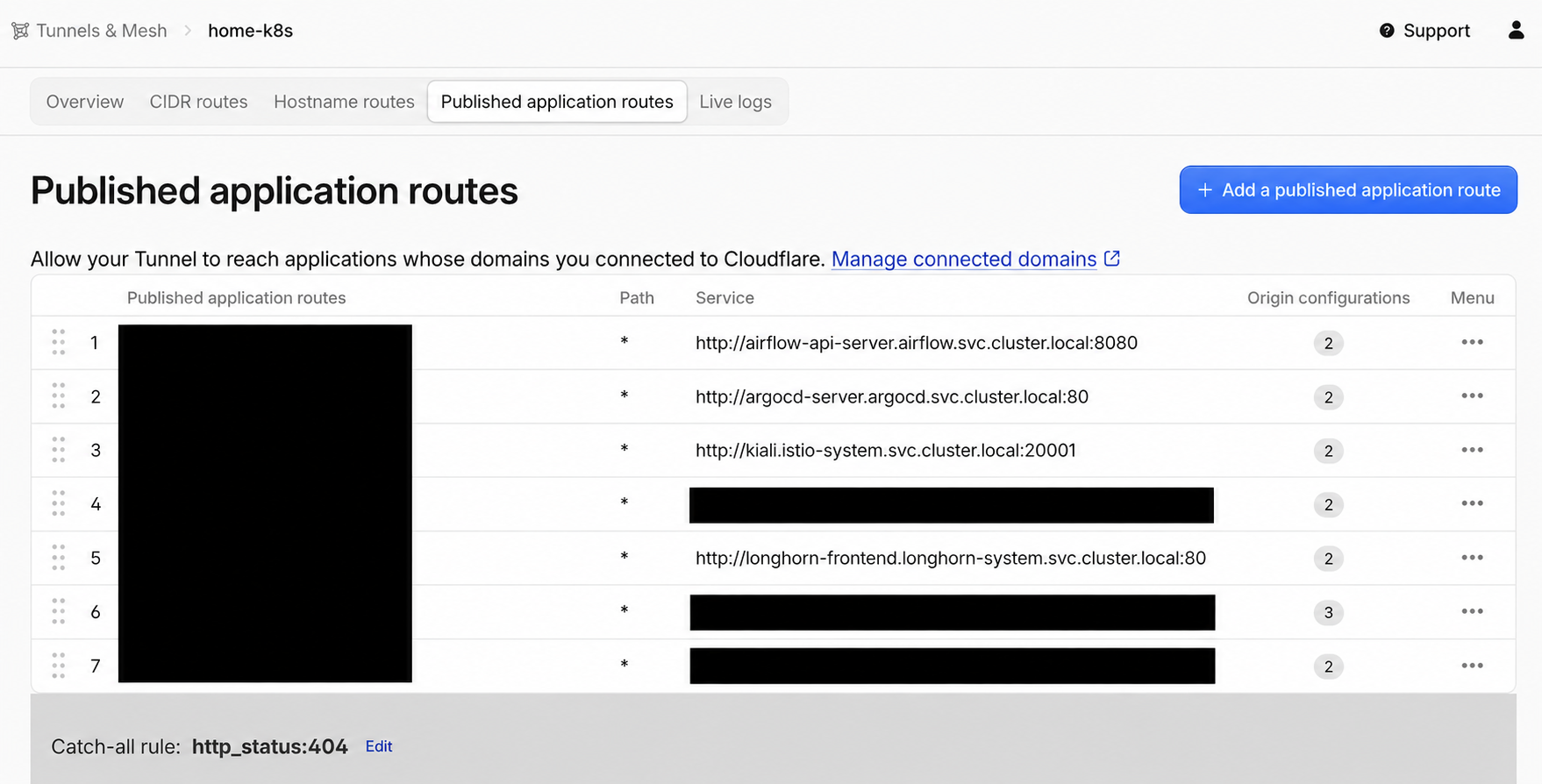
Cloudflare 的 Published application routes 將 hostname 明確對應到內部 origin;沒有對應規則的 hostname 則落到 catch-all http_status:404。
讓 cloudflared 在 origin 前再次驗證 Access JWT
每個受保護的 management UI hostname 都有對應的 Access AUD;設定 access.required=true 後,cloudflared 會在 proxy 到 origin 前驗證 Cf-Access-Jwt-Assertion。
請求流程因此包含兩個清楚的步驟:
- Cloudflare Access 驗證身分並套用 allow policy。
cloudflared確認 JWT 屬於這個 hostname 預期的 Access application,再轉送到 Service。
Cloudflare 在 Tunnel origin 的 Access settings說明了這項 connector-side validation。我的 route model 只有在 access_aud_tags 非空時才產生 Access block;空 list 代表刻意公開,不能成為 management UI 的預設值。
Access 是 identity-aware outer gate,不會取代 application authorization。Argo CD、Grafana 等系統仍要保留自己的 account、RBAC 與 session controls。
保留回復路徑的遷移順序
我沒有在一開始就停止 Caddy,而是先建立並驗證新路徑:
- 用 Terraform 建立 Tunnel 與 Access applications。
- 將 Tunnel token 存入 Vault。
- 確認 External Secrets 已建立
cloudflared-token。 - 透過 Argo CD 部署兩個
cloudflaredPods。 - 先用低風險 hostname 驗證 Access、AUD 與 Service routing。
- 每次只遷移一個正式 hostname,並從外部網路測試。
- 確認所有正式 hostname 都已停止使用 Caddy。
- 移除 router 的
80、443port forwarding 與對應的 inbound firewall rules。 - 確認 Caddy 沒有其他責任後,再停止它的公開入口角色。
這個順序讓 DNS 切換前仍有舊路徑可回復,也避免新舊入口在同一個未驗證步驟中一起消失。
從叢集內、LAN 與外部網路驗證
先檢查 connector 與 secret delivery:
kubectl -n cloudflare get deployment,pod,poddisruptionbudget
kubectl -n cloudflare get externalsecret
kubectl get clustersecretstore vault-cloudflare
kubectl -n cloudflare logs deployment/cloudflared --tail=100
再確認 origin Services 沒有因為遷移而變成 public:
kubectl get service --all-namespaces
kubectl get gateway,httproute --all-namespaces
最後從家用網路以外測試:
- 未登入的請求應抵達 Cloudflare Access,而不是 application。
- 不符合 allow policy 的帳號應被拒絕。
- 登入後的 hostname、redirect、WebSocket 與 callback URL 能正常工作。
- 家用 public IP 的
80、443無法從 Internet 連線。 - 停止一個
cloudflaredPod 後,新請求仍能經由另一個 replica 進入。 - 未設定的 hostname 回傳 404,不會連到其他 Service。
Pod 顯示 Running 只能證明 process 存活。只有當舊入站路徑已關閉、每個管理介面都受到預期的 Access policy 保護,遷移才算完成。
Tunnel 仍然留下哪些風險
Tunnel token 仍是高權限憑證,需要避免出現在 Git、shell history、CI logs 或 Terraform plan artifacts,並準備實際可執行的 rotation 程序。
cloudflared 位於叢集內,通常能解析並連到許多 Services。NetworkPolicy 應限制它只能到達預定公開的 namespaces 與 ports,降低 connector 遭入侵後的 lateral movement。
Cloudflare edge 到 connector 的路徑受到 Tunnel 保護,不代表 connector 到 origin 的 HTTP 在所有環境都足夠安全。不受信任的 node network 或合規環境應使用 HTTPS origin 或 Istio mTLS。
Origin 看到的直接 peer 通常是 connector。應用程式若以 client IP 做 audit、rate limit 或安全判斷,必須只從可信任的 proxy chain 接收正確的 Cloudflare header,不能接受任意來源自行宣告的相同 header。
Cloudflare Access、DNS、Tunnel 與 edge 也會成為遠端存取的共同依賴。我保留受限制的 LAN 或 VPN 維護路徑,Cloudflare 或 Internet 中斷時仍能管理叢集,但不因此重新開放 public 80、443。